Data visualization

Matt Bhagat-Conway

Why visualize data

  • Many people are visual thinkers
  • Data visualization can remove the need to understand exact numbers and show the big picture
  • Data visualizations are less likely to put people to sleep than tables 😴

The power of data visualization

  • Data visualization helps us make sense of large datasets
  • We can make conclusions and hypotheses that would be difficult from looking at the data alone
  • But, we can also mislead and misdirect

The power of data visualizations: Anscombe’s quartet
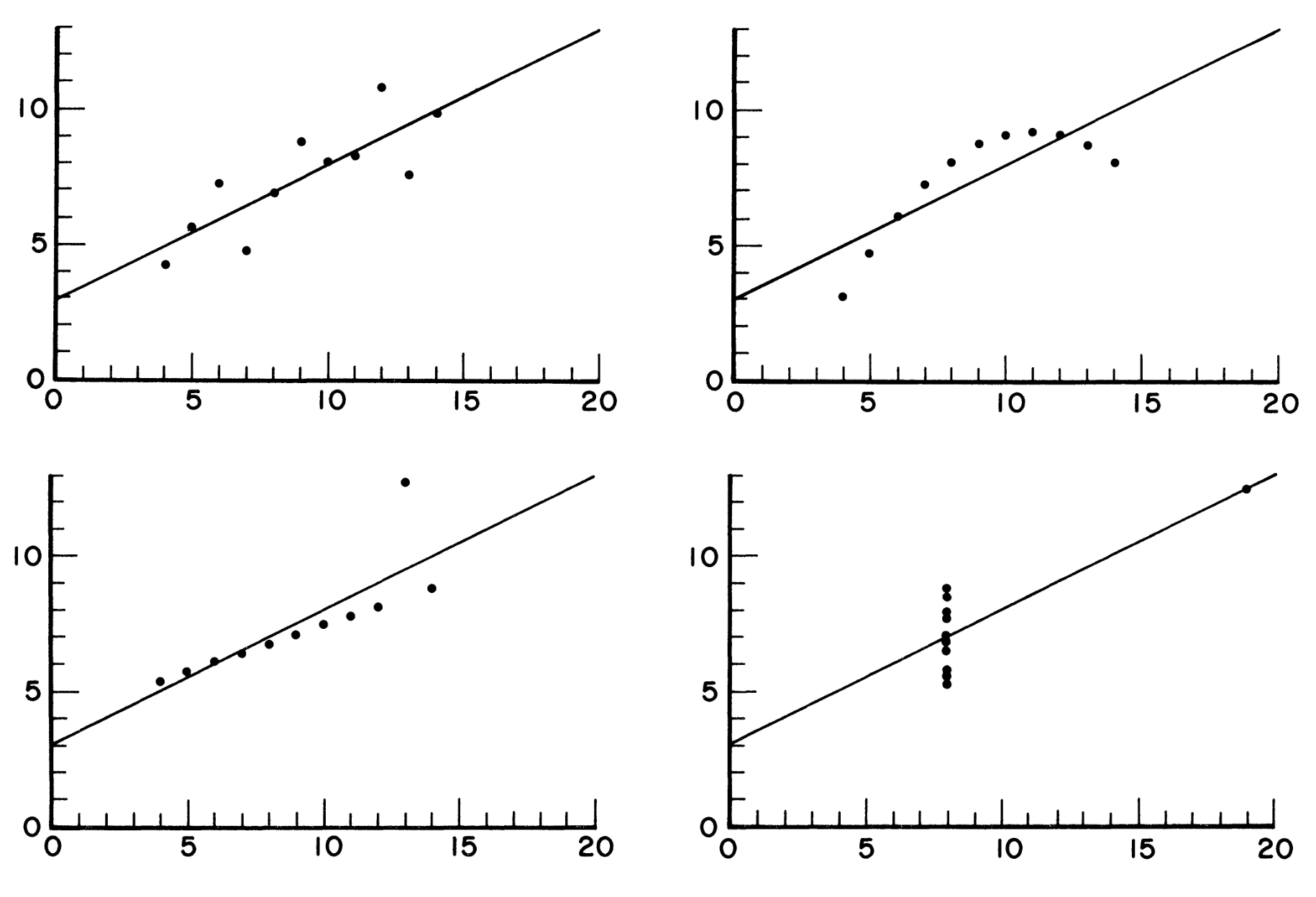
Scatterplots of four datasets with the same summary statistics, but very different shapes.

Anscombe (1973)

  • These datasets all have the same means, standard deviations, correlation coefficients, regression lines, and \(R^2\)

Histograms

  • A histogram visualizes a univariate (one variable) distribution
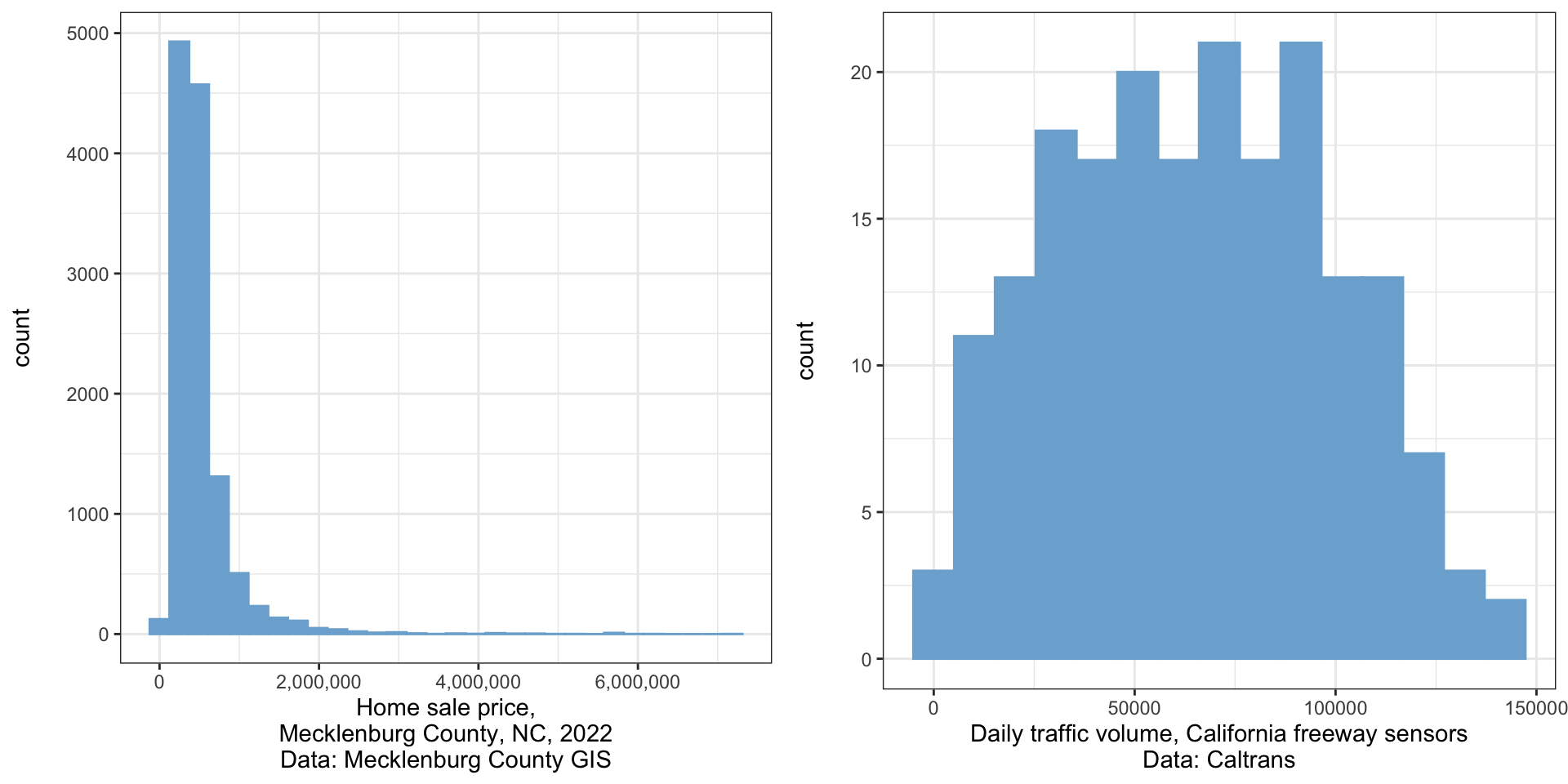
Two histograms (bar plots of the frequency of values in different mutually exclusive categories). The left histogram shows that home sale price is heavily right-skewed. The right histogram shows that daily traffic volumes at sensors in California is relatively symmetrical.

Creating a histogram in Excel

  • Select the column you want to create a histogram of
  • Choose Insert -> Charts -> Statistical -> Histogram
  • By double-clicking on the bars you can edit the number of bins, bin size, how outliers are handled
  • Histograms should not have gaps between the bars even though they do by default in Excel
    • After double-clicking on the bars, choose the Fill and Line tab (paint can icon) and set the border to “solid line” to fill the gaps

Boxplots/box and whisker plots

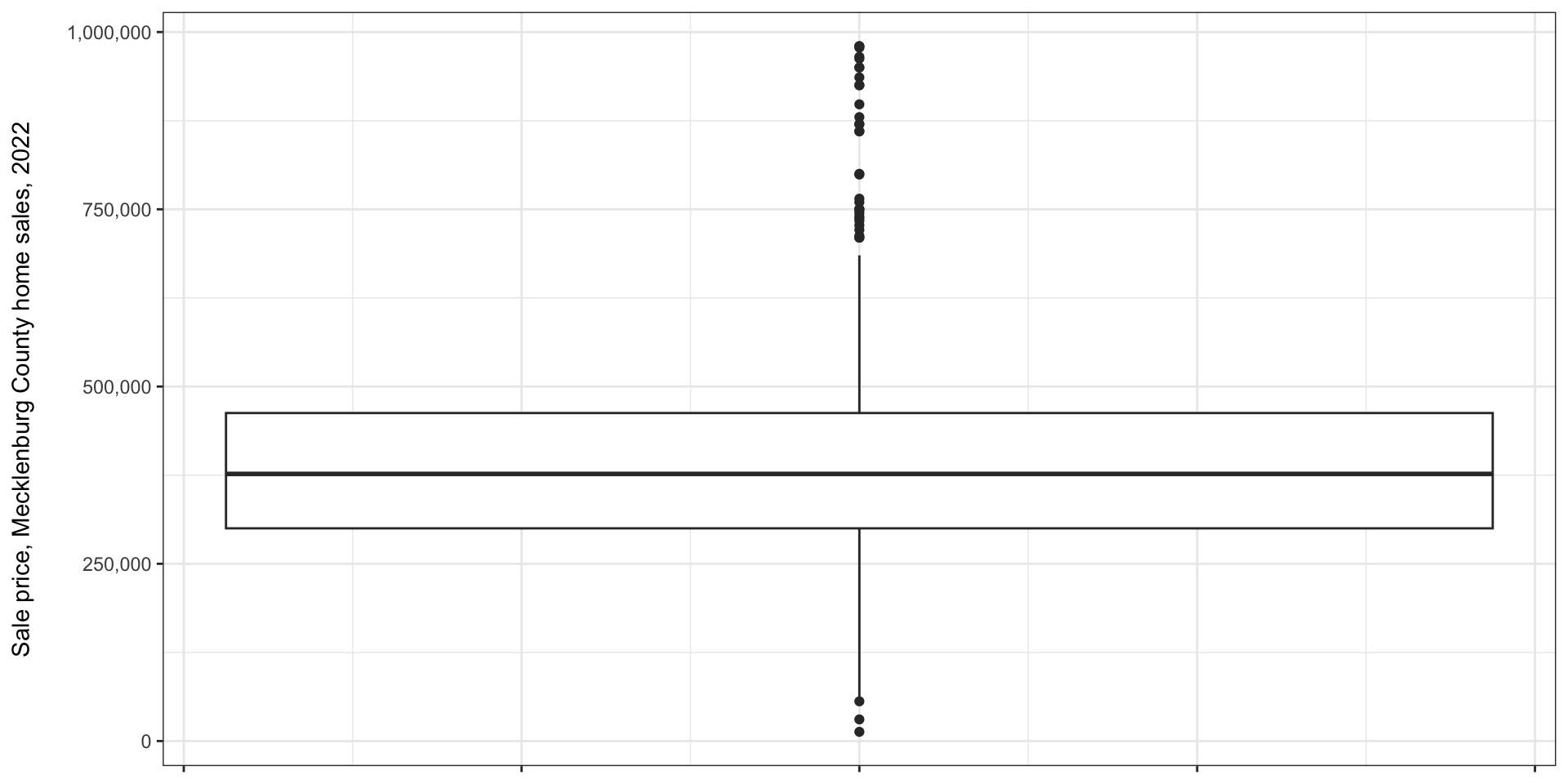
  • Box plots visualize data by showing the median, 25th and 25th percentiles, tails, and outliers
  • The center line is the median, the top of the box is the 75th percentile, and the bottom of the box is the 25th percentile
  • Whiskers generally extend to largest/smallest data value less than 1.5 \(\times\) interquartile range from the ends of the box
    • Sometimes 5th/95th percentiles
  • Points beyond these are plotted individually as outliers

Boxplots/box and whisker plots

A box-and-whisker plot of home sale prices in Charlotte, showing the median around $375,000, the 25th percentile around $300,000, and 75th percentile around $460,000. The whiskers extend down to around $75,000 and up to $700,000. There are outliers plotted above and below the boxplot.

Making a boxplot in Excel

  • Select the data you want to create a boxplot for
  • Insert -> Charts -> Statistical -> Box and Whisker

Multiple boxplots

  • Often, you will see multiple boxplots presented next to one another
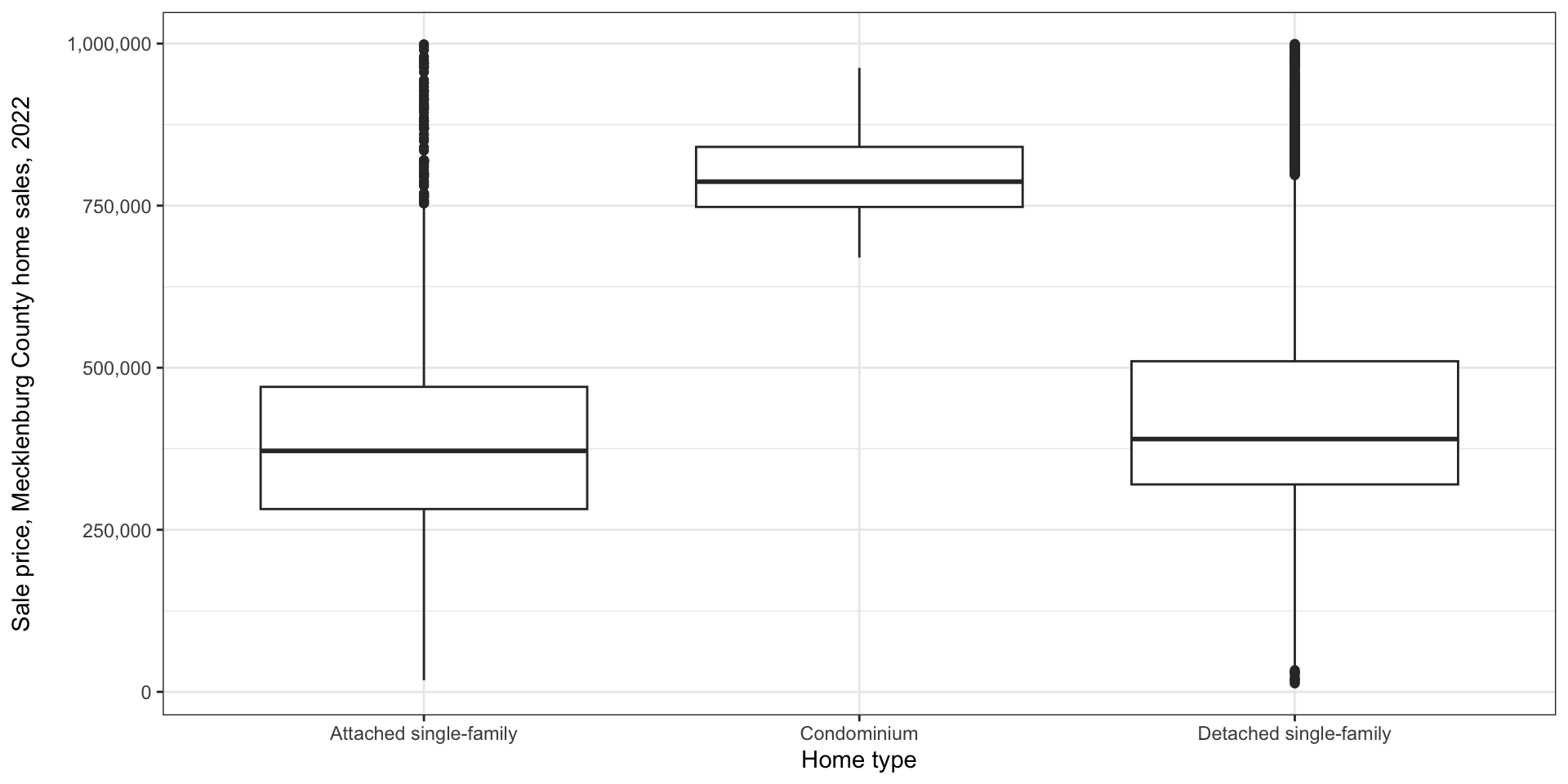
Three boxplots of 2022 home sale values in Mecklenburg County. Attached single family and detached single family homes are relatively similar, with the 25th percentile, median, 75th percentile, and whiskers slightly higher for detached homes. Condominiums have a very high sale value, with a median around $775,000. There are many outliers for single family homes, but none for condominums, likely because there are few condominium sales overall.

Multiple box plots in Excel

  • If you select multiple columns, Excel will make multiple box plots
  • Unfortunately, often you want to do this by separating out different observations in the same column
  • This is inexplicably difficult in Excel
  • Best way I’ve found is to make a table in Excel, filter by the attributes you want, and copy variables to a new sheet

Scatter plots

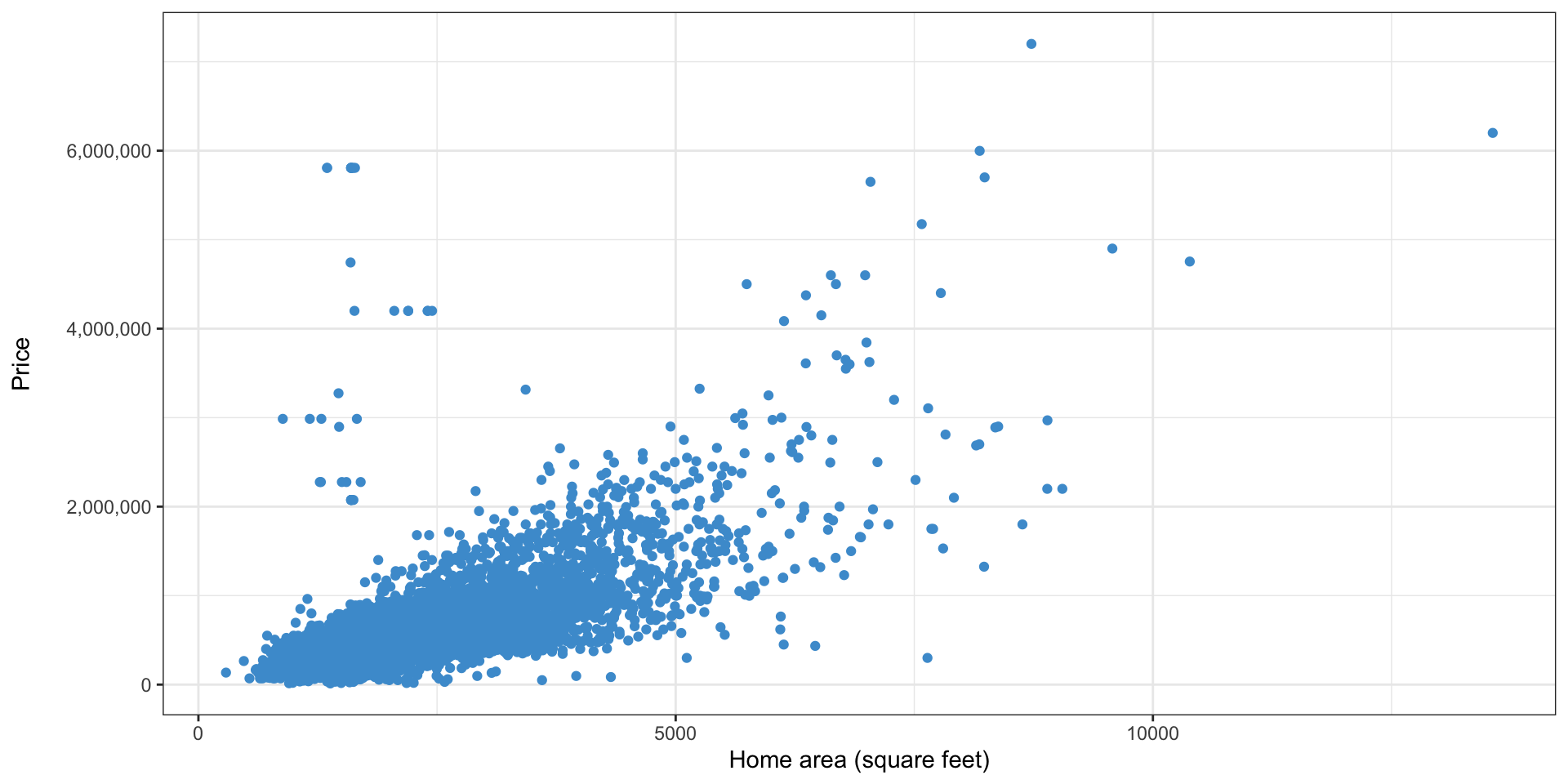
  • Used when you have two continuous variables
  • Simply plot the location of each data point
  • In a regression context, the independent variable is customarily on the x axis
Scatter plots: other properties

  • When there are many points, reducing the size or opacity can help show trends
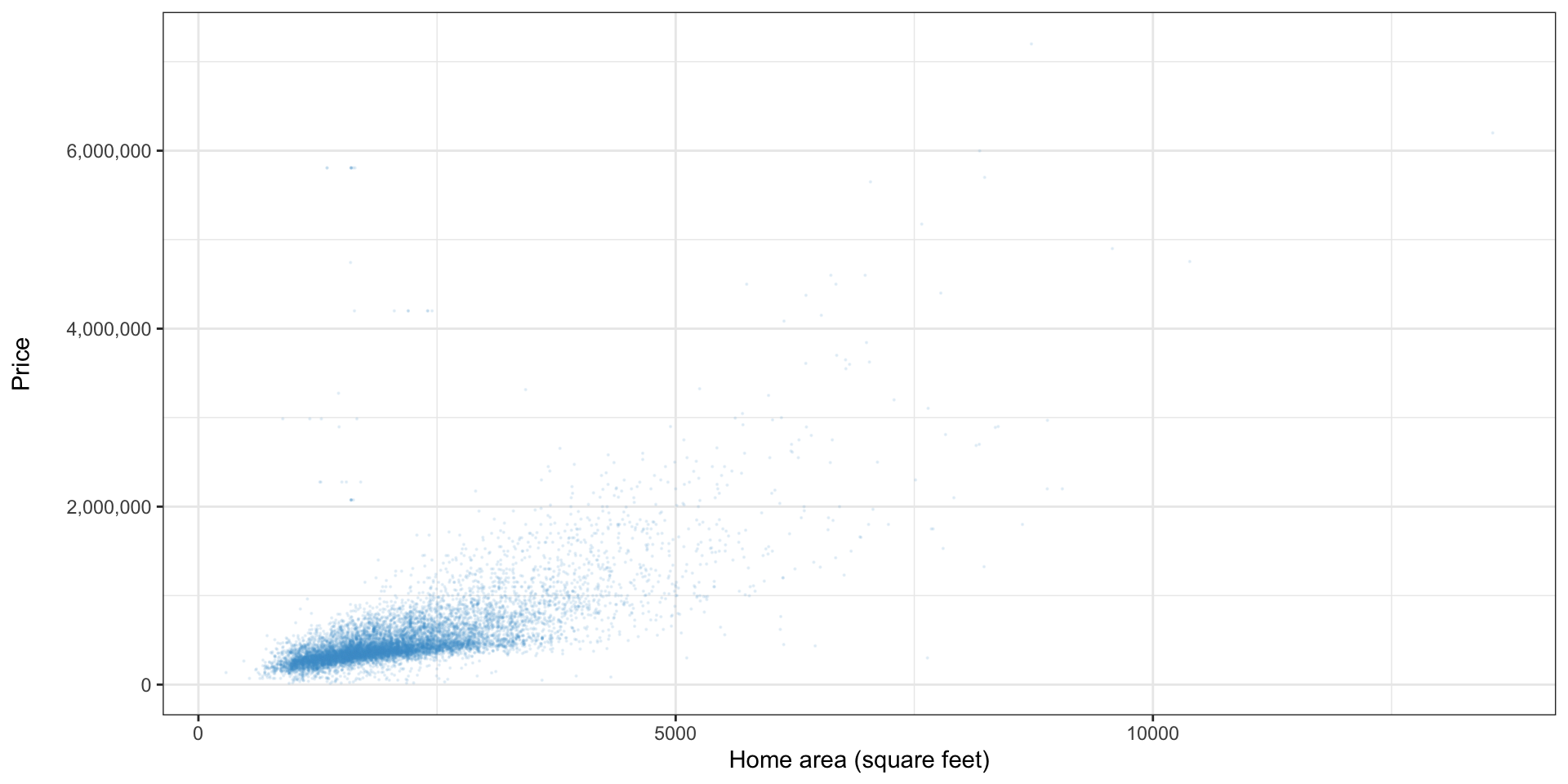
Scatter plot of home size on the x axis and home price on the y axis, showing a positive correlation.

Scatter plots in Excel

  • Select the data you want, then Insert -> Chart -> Scatter plot
  • To change the size, select Format tab, then the series name on the left, and open the format pane
  • Click the Fill and Line tab (paint bucket), then select Marker, Marker options, Built-in, and edit the size
  • Transparency

Trendlines

  • It may occasionally be useful to add a trendline
  • Format -> Add Chart Element -> Trendline

The curse of trendlines

  • Excel provides many options for trendlines; don’t get carried away
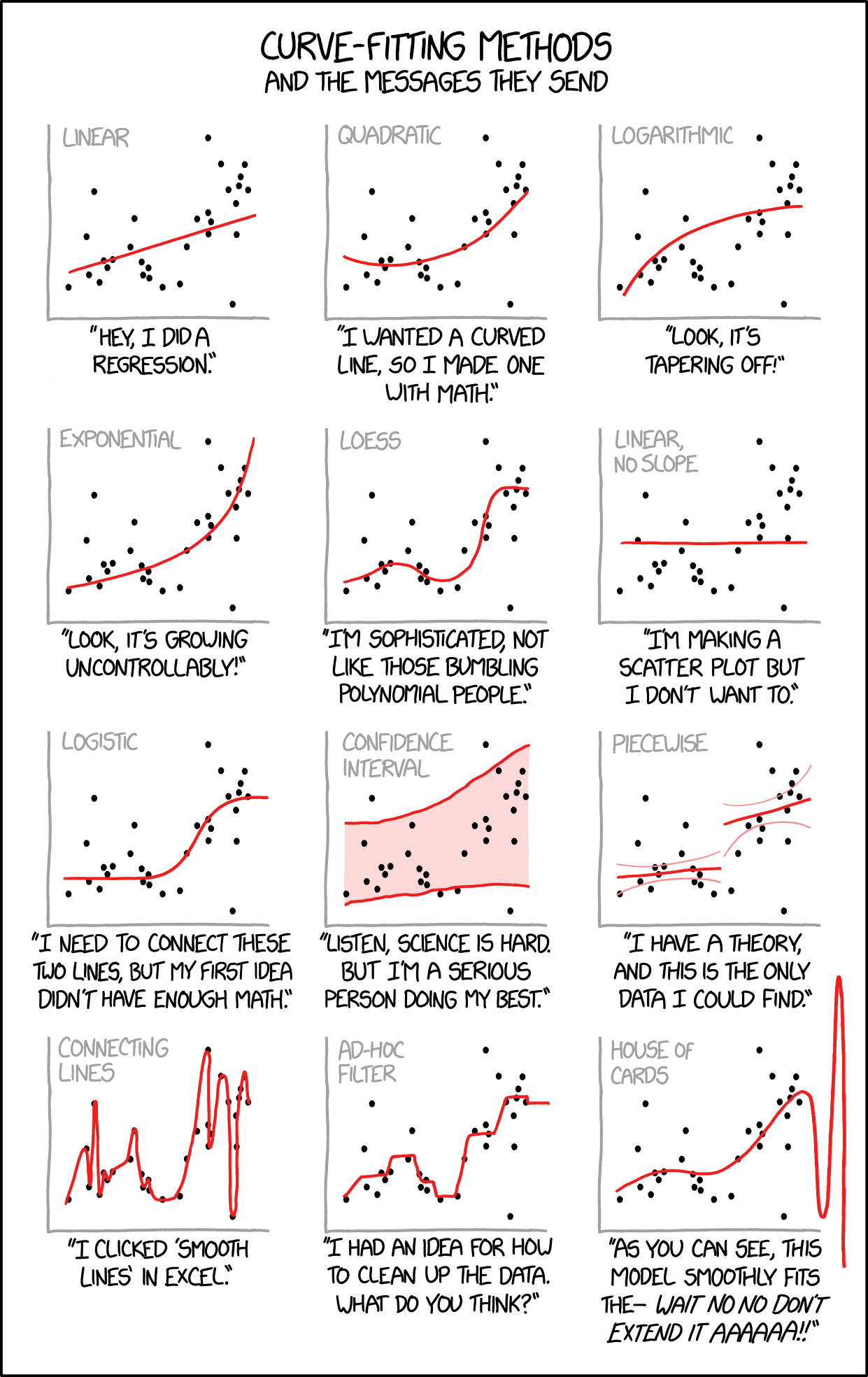
Comic showing the same data with 12 different types of curve fit to it, many indicating contradictory conclusions.

© xkcd

Bar charts

  • Used with one continuous and one categorical variable
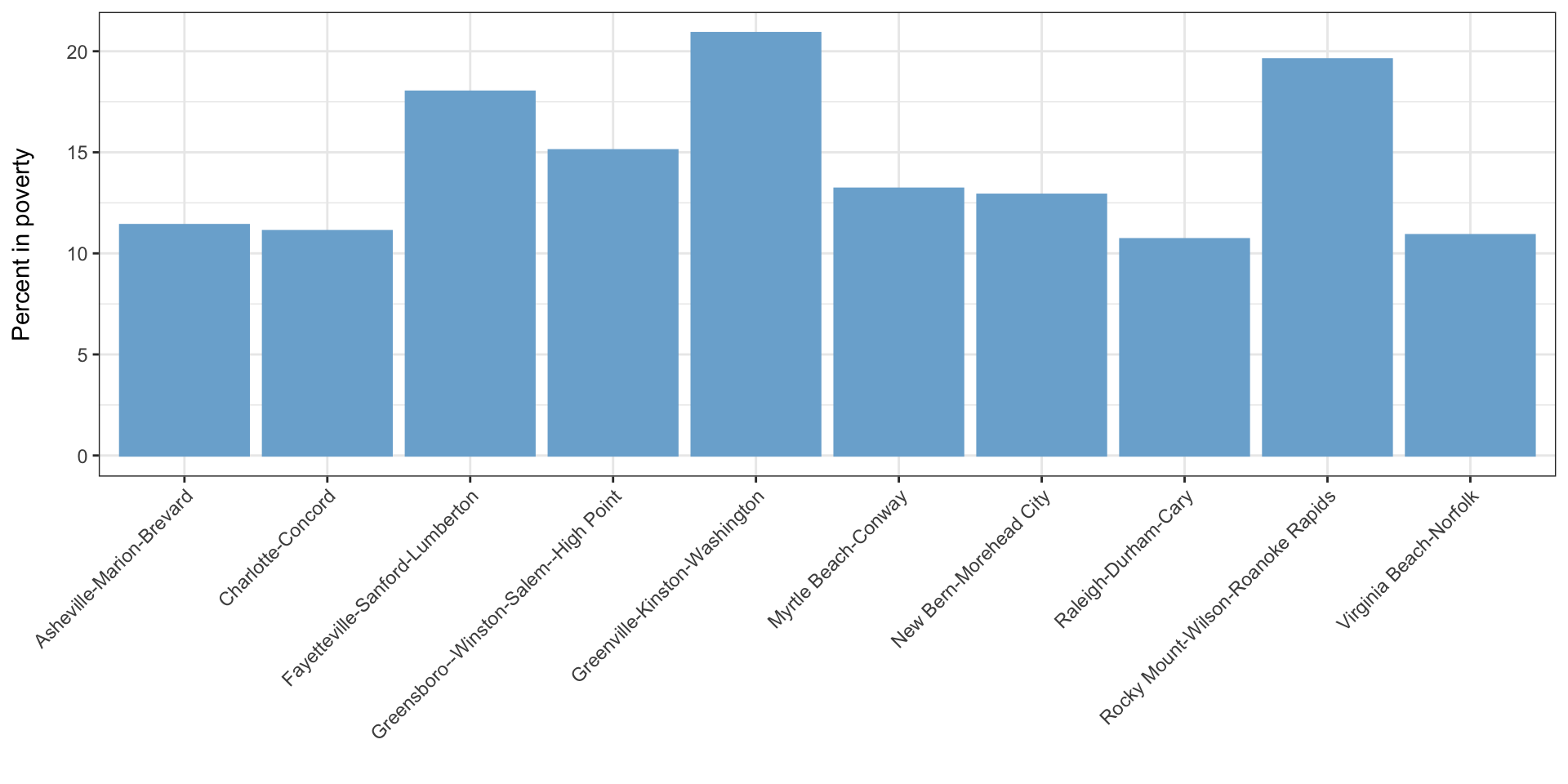
Bar chart showing poverty in several areas in North Carolina; poverty is highest in Greenville and lowest in Raleigh-Durham

Bar charts in Excel

  • Select the column with labels and the column with values
  • Insert -> Chart -> Bar chart

Error bars

  • Error bars indicate a margin of error/confidence interval around the tops of the bars
    • Or occasionally just the standard error - be careful here!
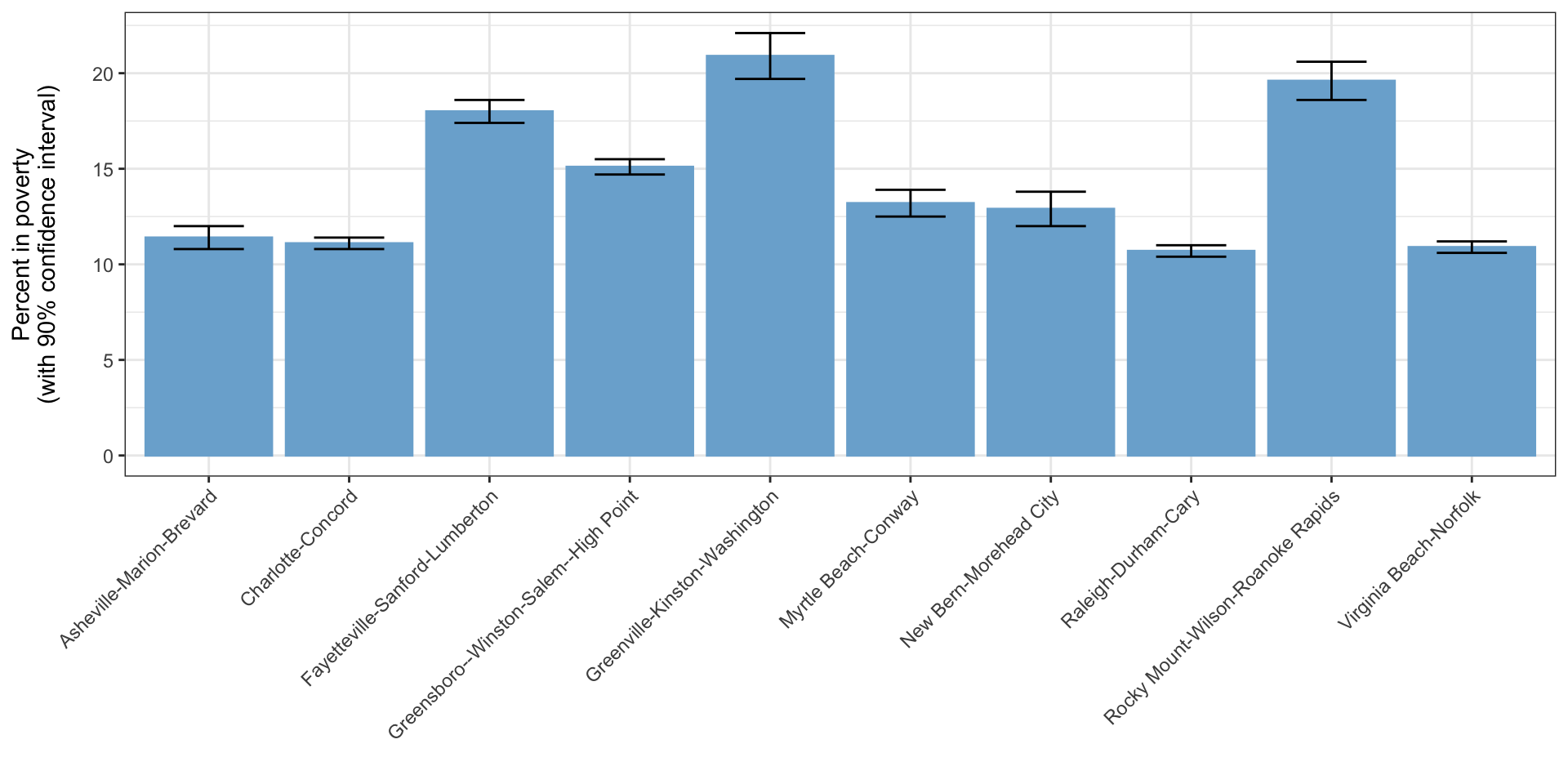
Bar chart showing poverty in several areas in North Carolina; poverty is highest in Greenville and lowest in Raleigh-Durham, with error bars showing that e.g. Raleigh-Durham and Charlotte have statistically insignificant differences in poverty.

Grouped bar charts

  • A common variation of the bar chart is the grouped bar chart
  • Used when you want to have multiple bars associated with each \(x\)-axis value
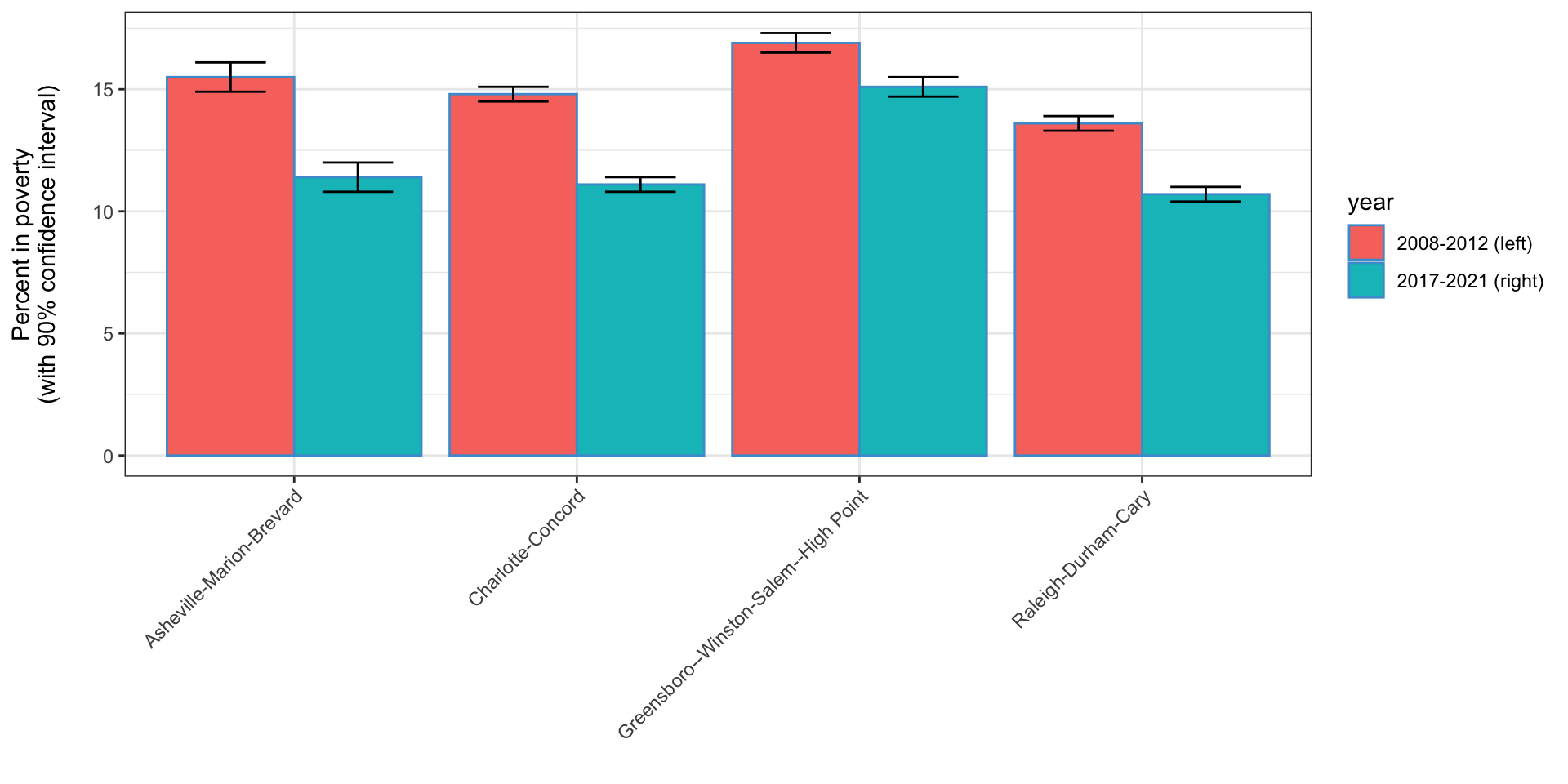
Bar chart showing poverty in several areas in North Carolina in 2008-2012 and 2017-2021; poverty has dropped across the board in this time period.

Grouped bar charts in Excel

  • If you select multiple columns when creating a bar/column chart in Excel, a grouped bar chart is the default

Stacked bar charts

  • Often used with percentages but can be used with other things as well
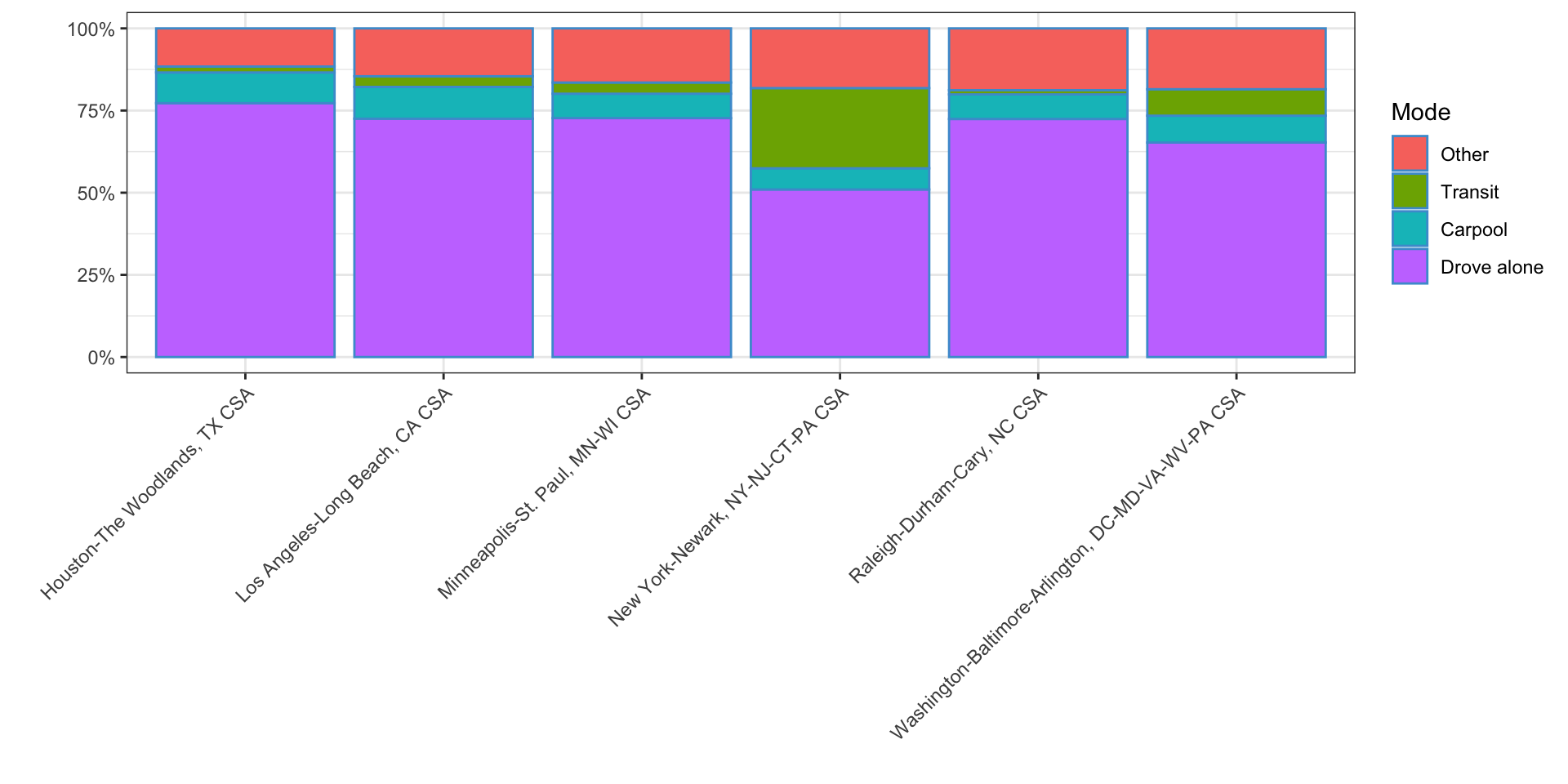
Commute mode share in a number of US combined statistical areas. Driving is dominant in most cities, but much lower in New York.

Stacked bar chart in Excel

  • Each portion of the stacked bar should be in a different column
  • Select all the columns and choose Insert -> Chart -> Stacked Column
    • or 100% stacked column to have Excel normalize to 100% for you

3D bar charts

  • 3D bar charts look cool but they’re confusing
  • Generally, the bar height represents the value being represented, but it is easy to misinterpret the area or volume as the value being represented

Line charts

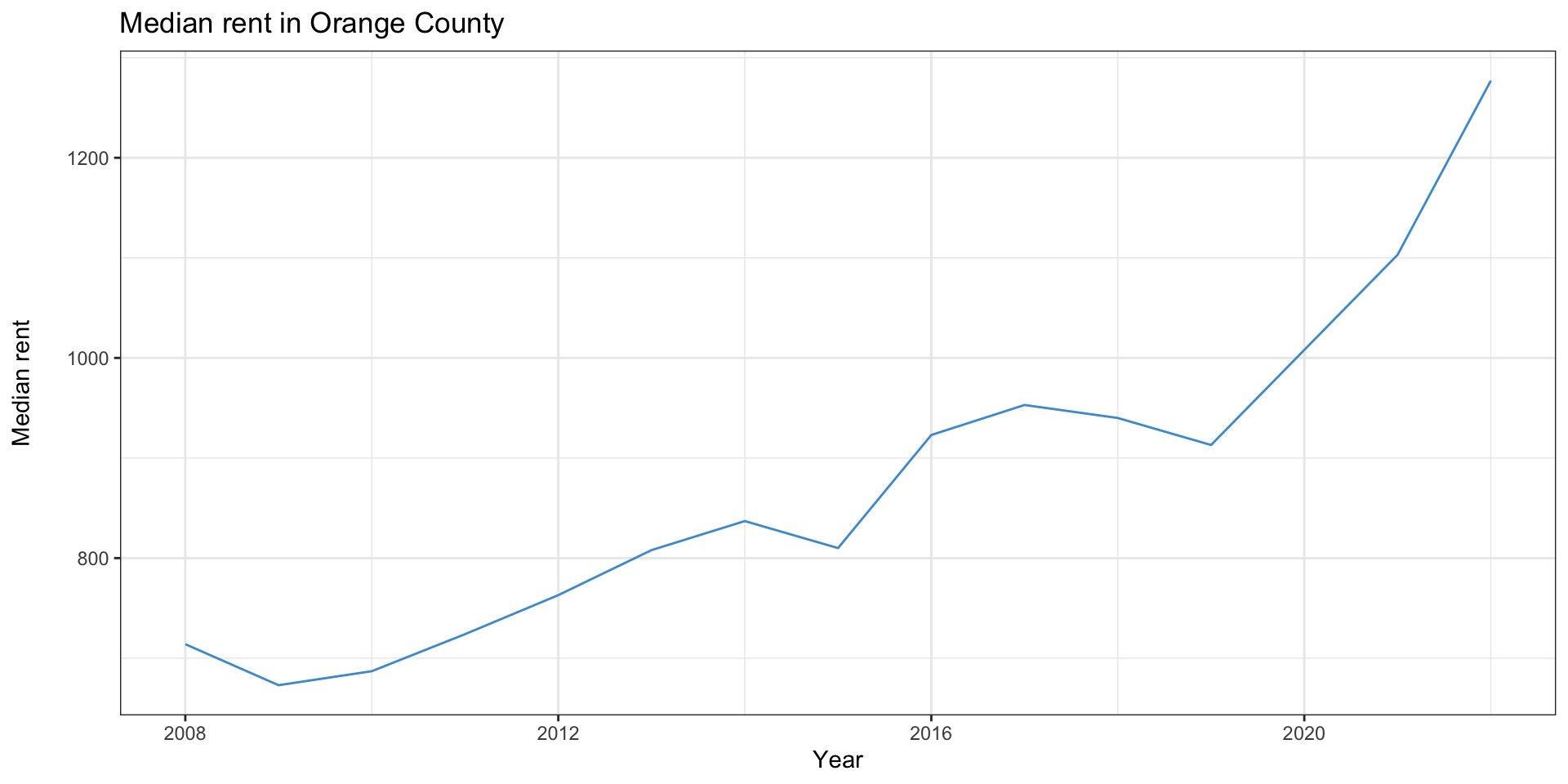
  • Line charts suggest change over time, so the \(x\) axis should always be time
  • This graph also shows a common way graphs can mislead
  • look at the extents of the \(y\) axis
Line chart showing significant rent increases in Orange County since 2008. Y axis starts at $700, which exaggerates the size of the change

Multiple lines

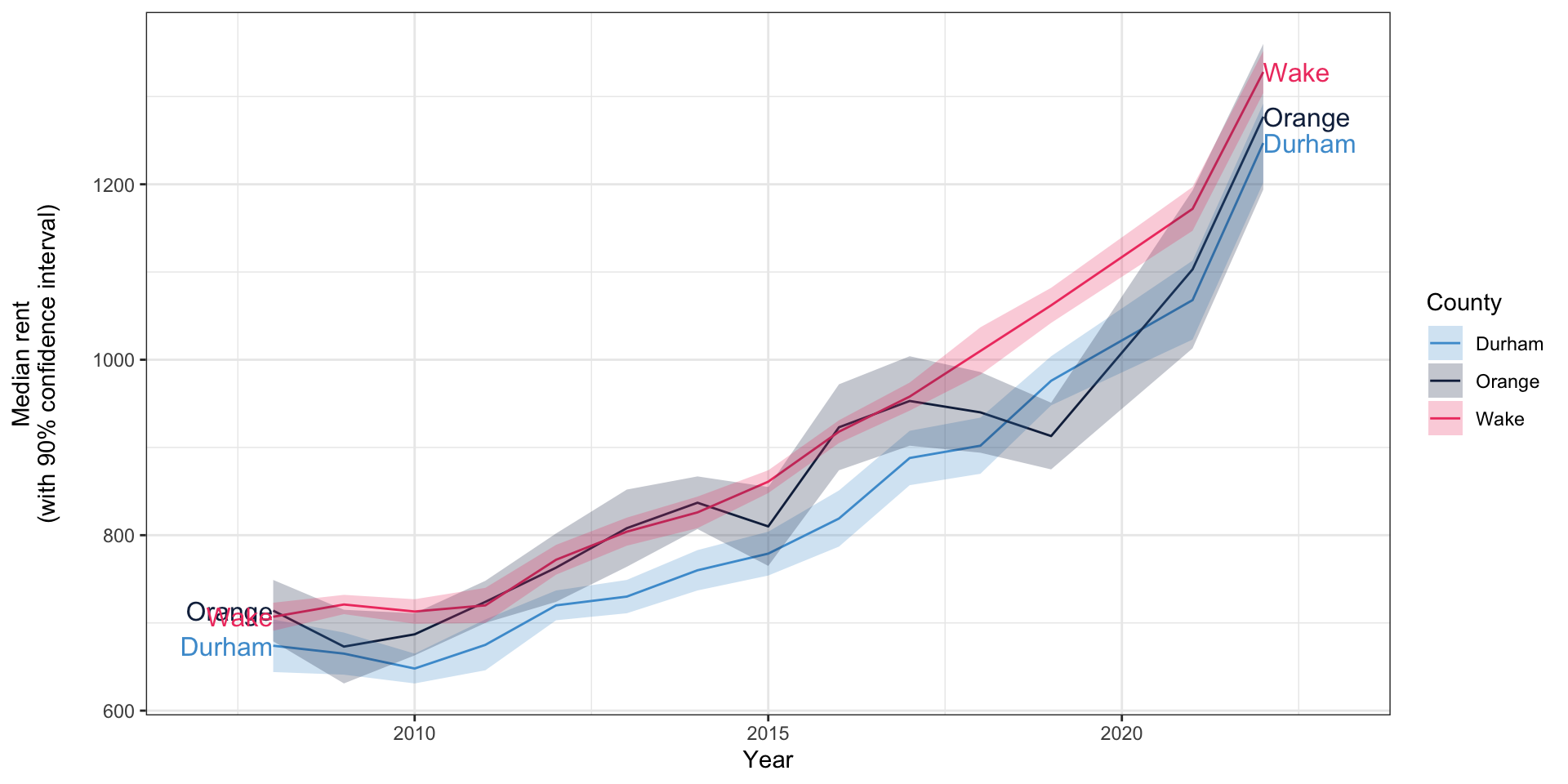
  • It’s common to have multiple lines on line charts
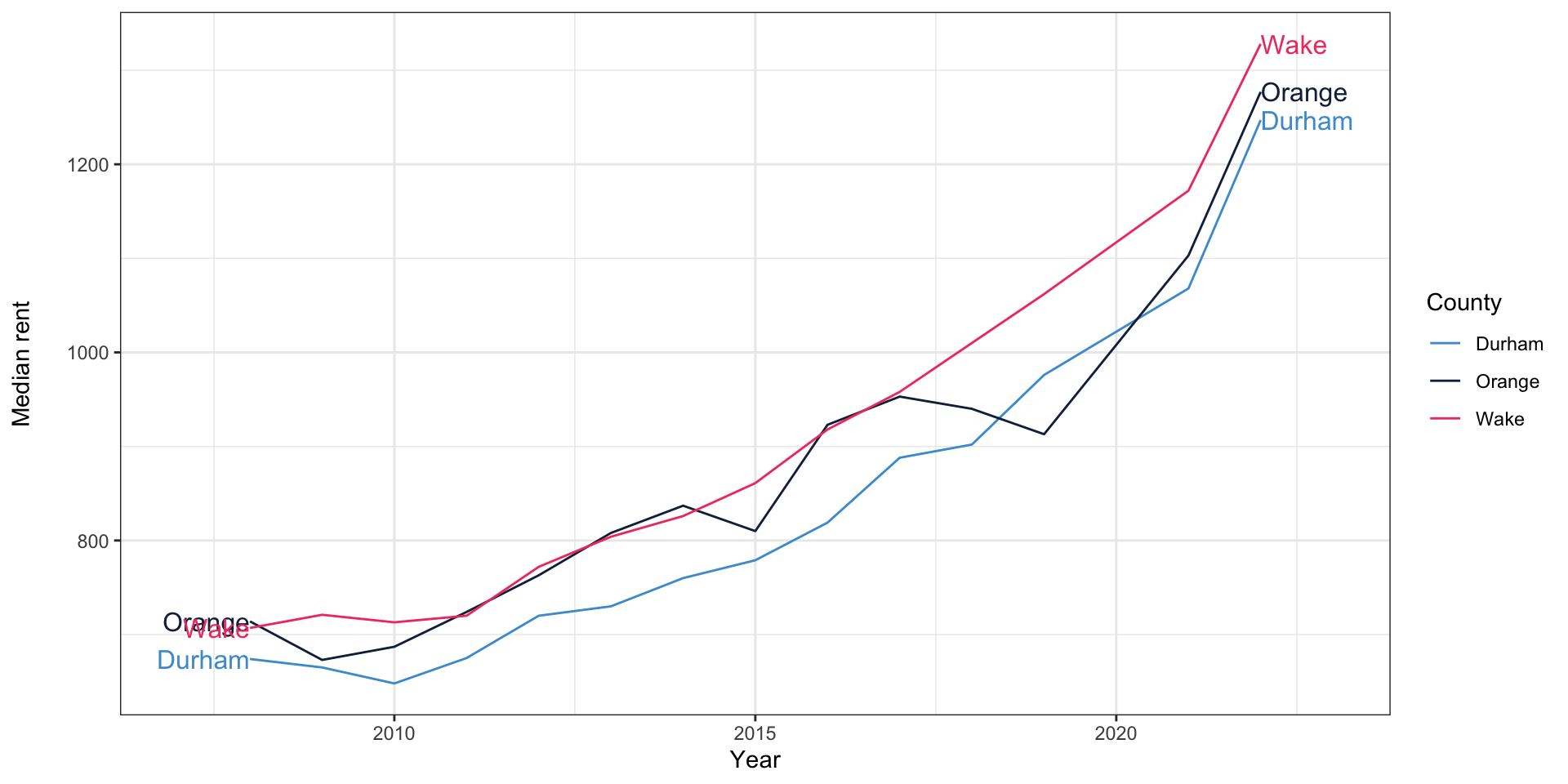
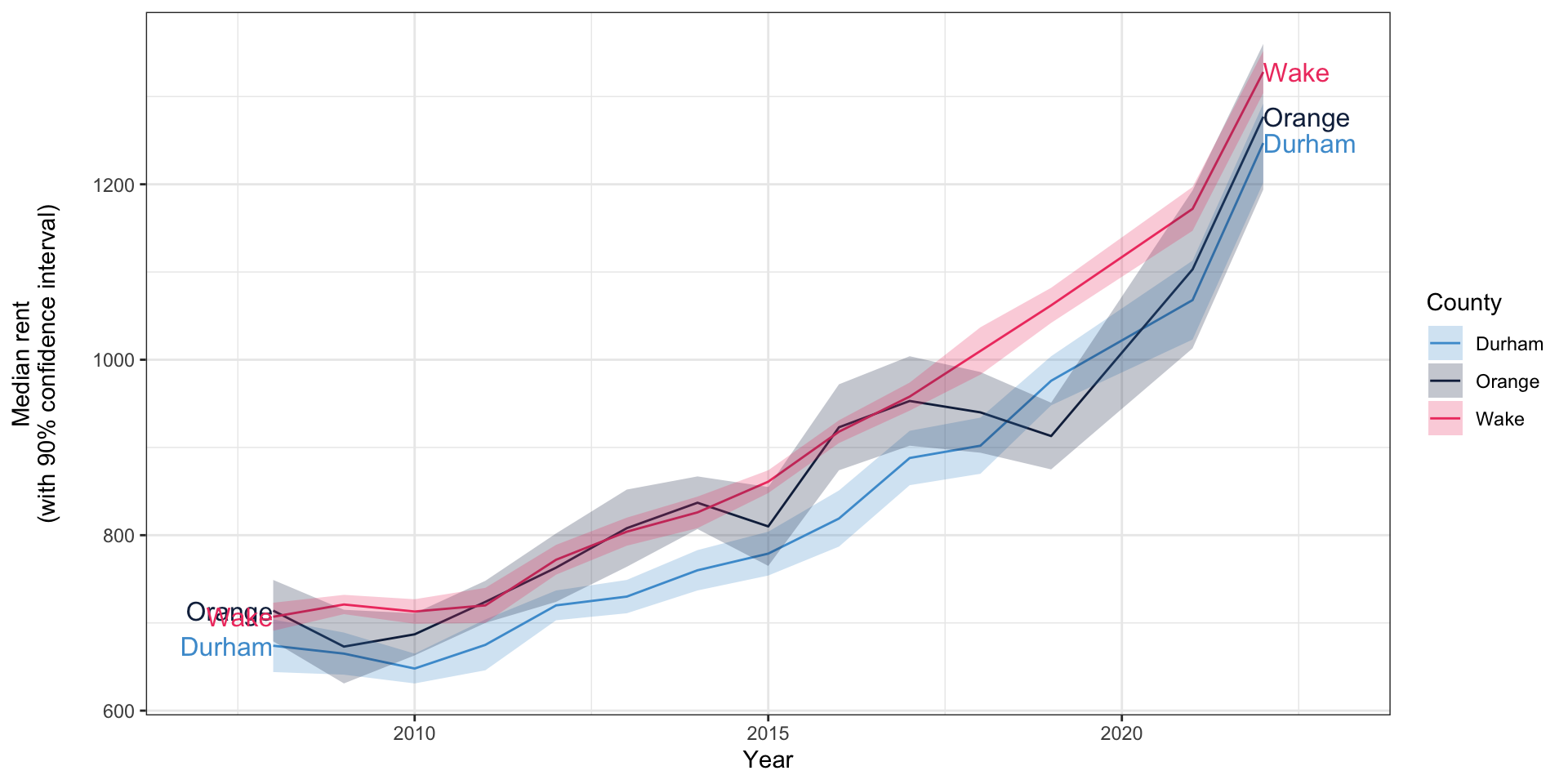
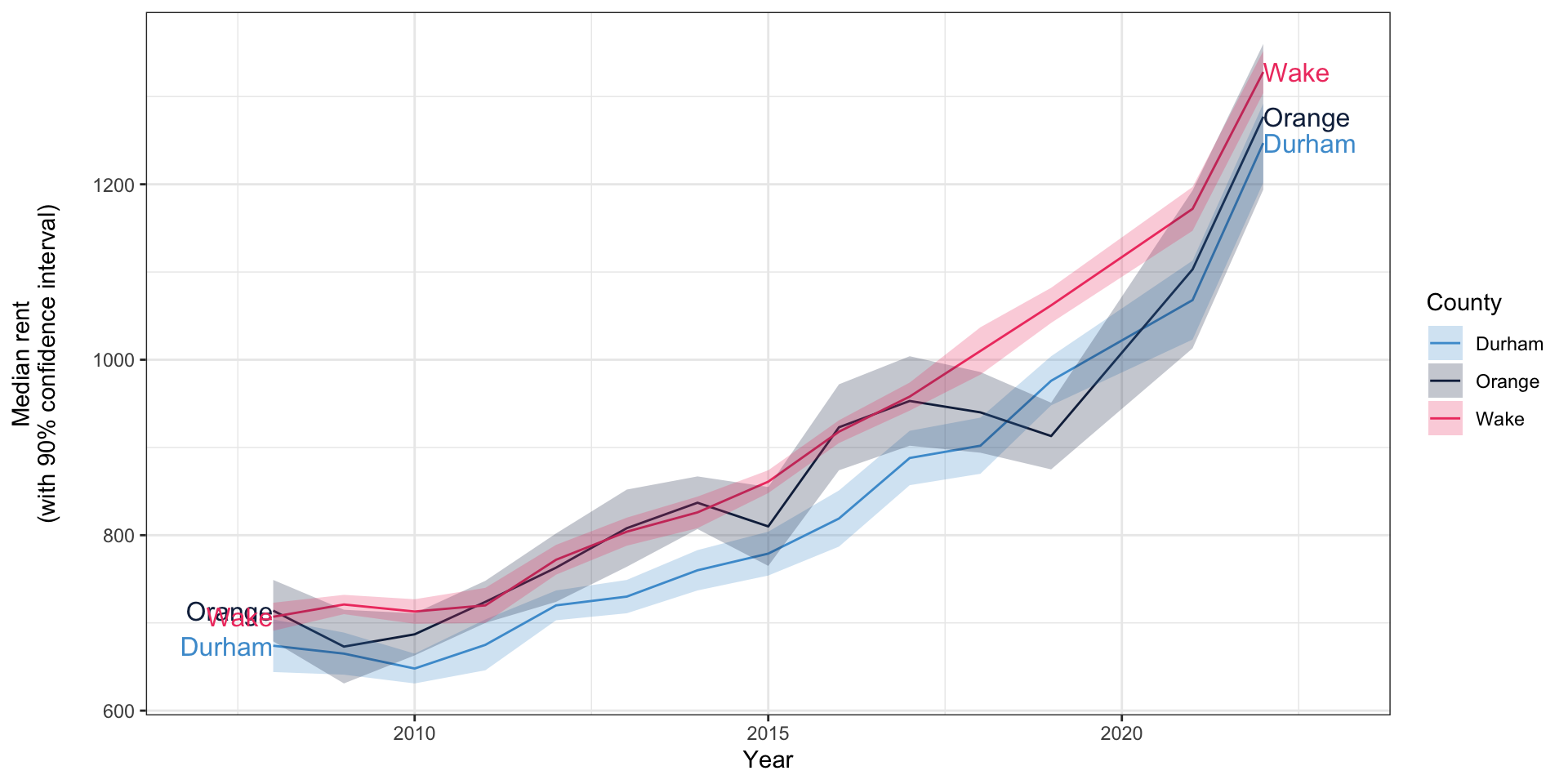
Line chart showing significant rent increases in Orange, Durham, and Wake Counties since 2008.

Multiple \(y\) axes

  • Occasionally, you’ll even see a graph with multiple \(y\) axes
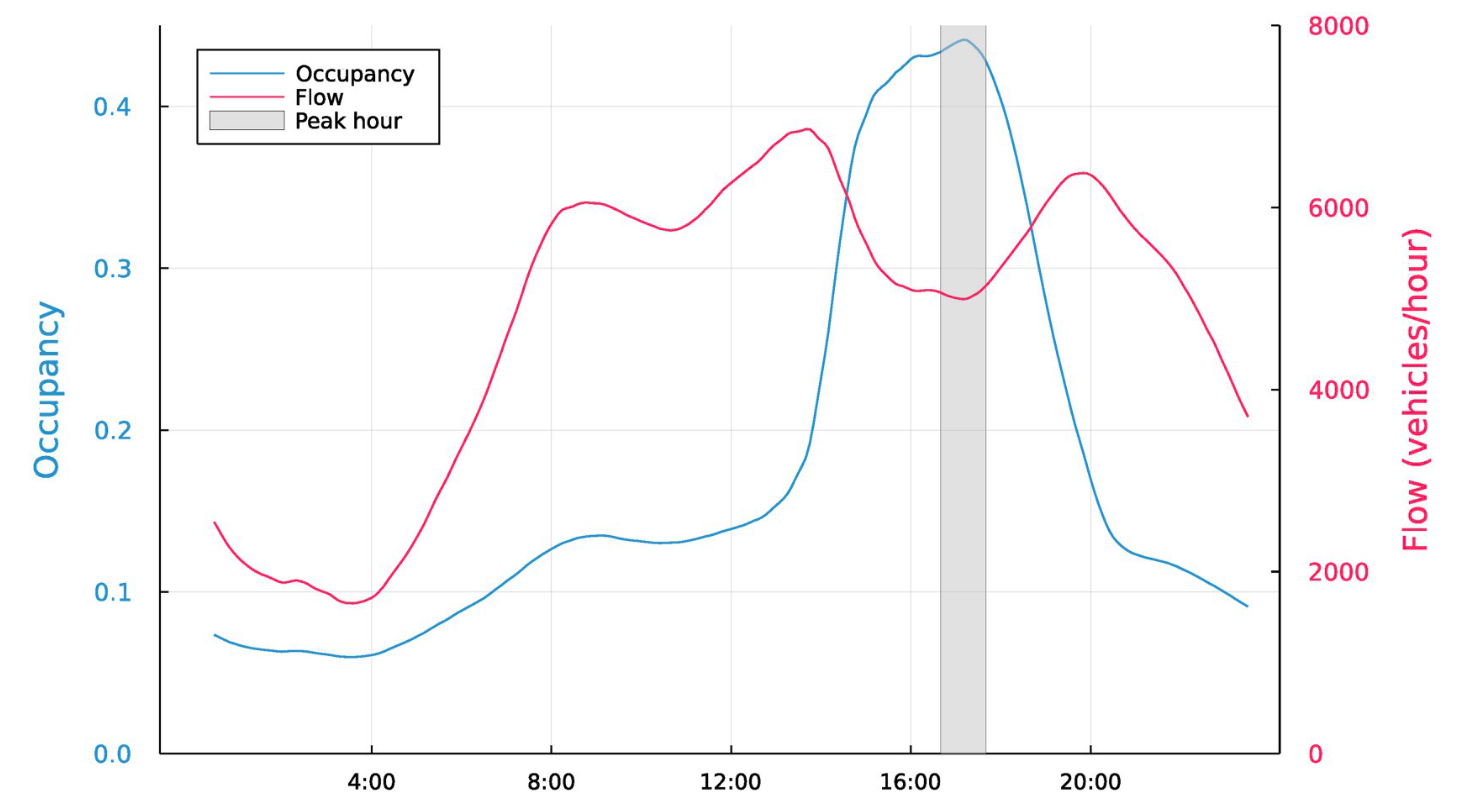
Line chart showing traffic flow and congestion on a California freeway, with separate axes for flow and level of congestion.

Bhagat-Conway and Zhang (2023)

Line charts in Excel

  • In Excel, how you insert a line chart depends on your \(x\) axis
  • If you want Excel to generate the \(x\) axis as 1, 2, 3…, you need to add a line chart
  • If you have a column with the \(x\) axis values, you want an XY (scatter) plot with lines

Line charts and error bars

  • You’ll occasionally see line charts with error bars on them
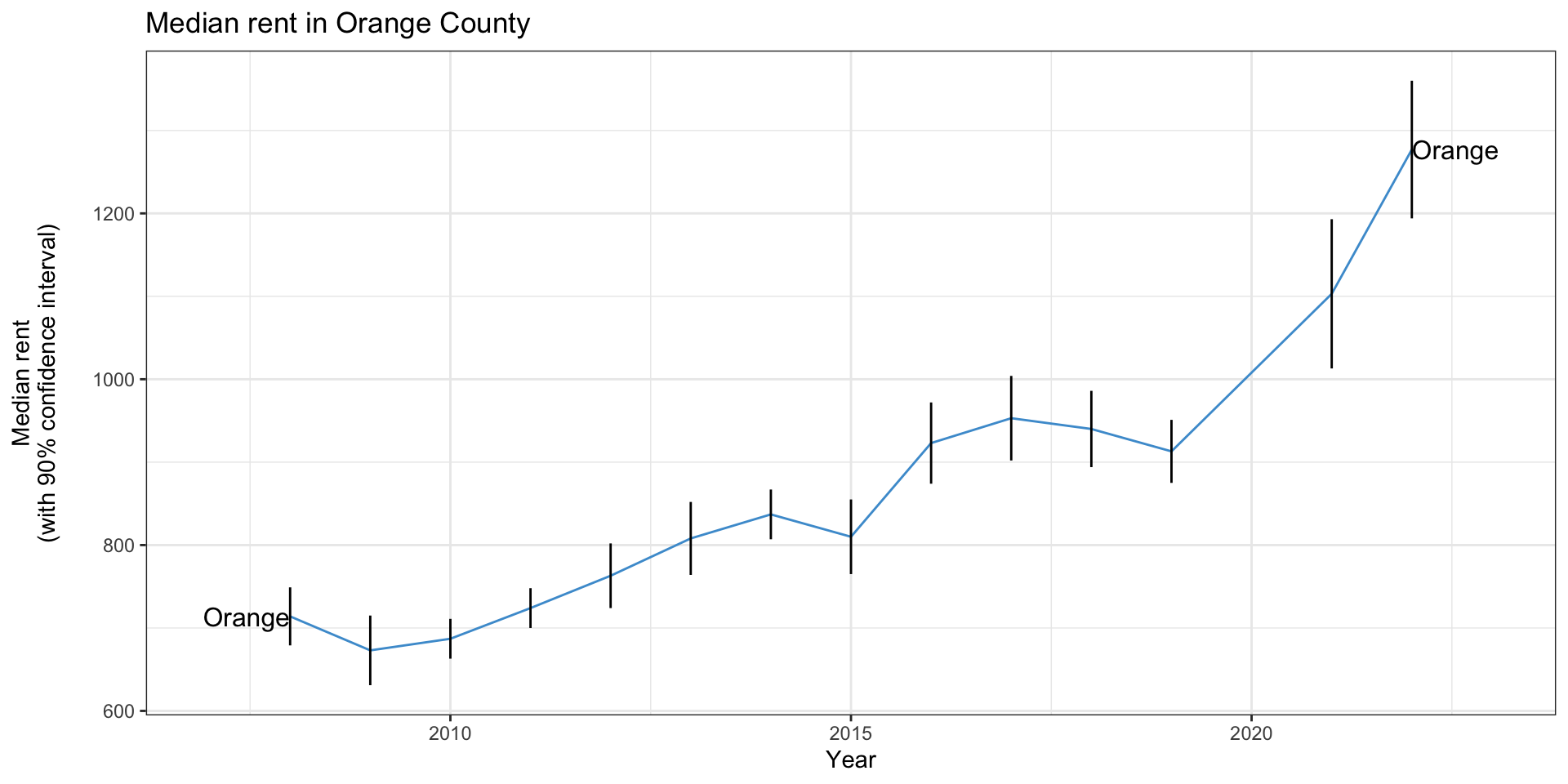
Line chart showing significant rent increases in Orange County since 2008, with error bars at each year.

Line charts and error bars

  • It’s more common to see line charts with error “ribbons”
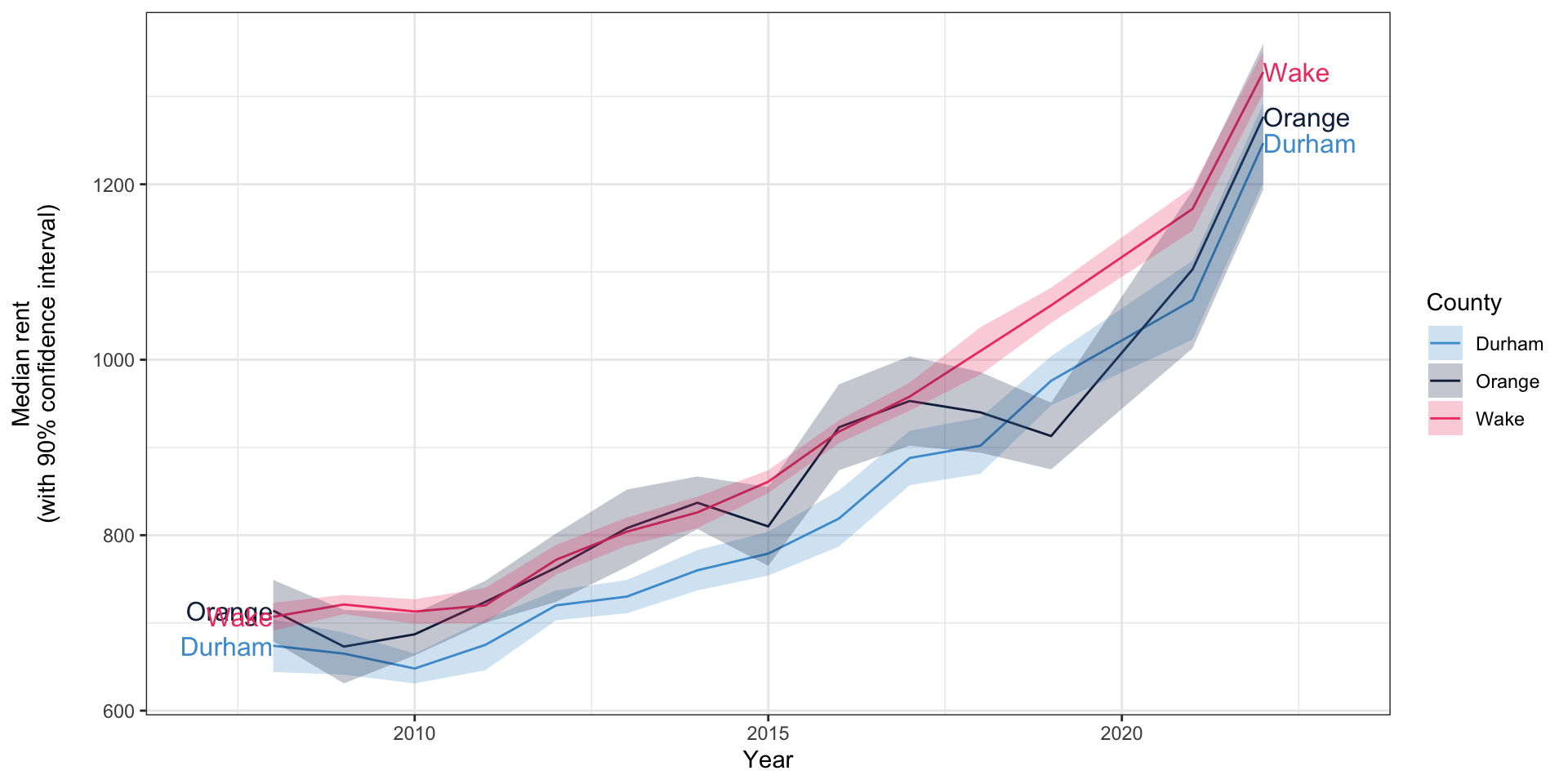
Line chart showing significant rent increases in Orange County since 2008, with error "ribbons" showing a shaded area representing the confidence interval.

Pie charts

  • Pie charts are common in government and business but rare in academia
  • Can be hard to compare relative sizes
  • Should only be used with data that totals 100%
  • Avoid 3D pie charts for similar reasons as 3D bar charts
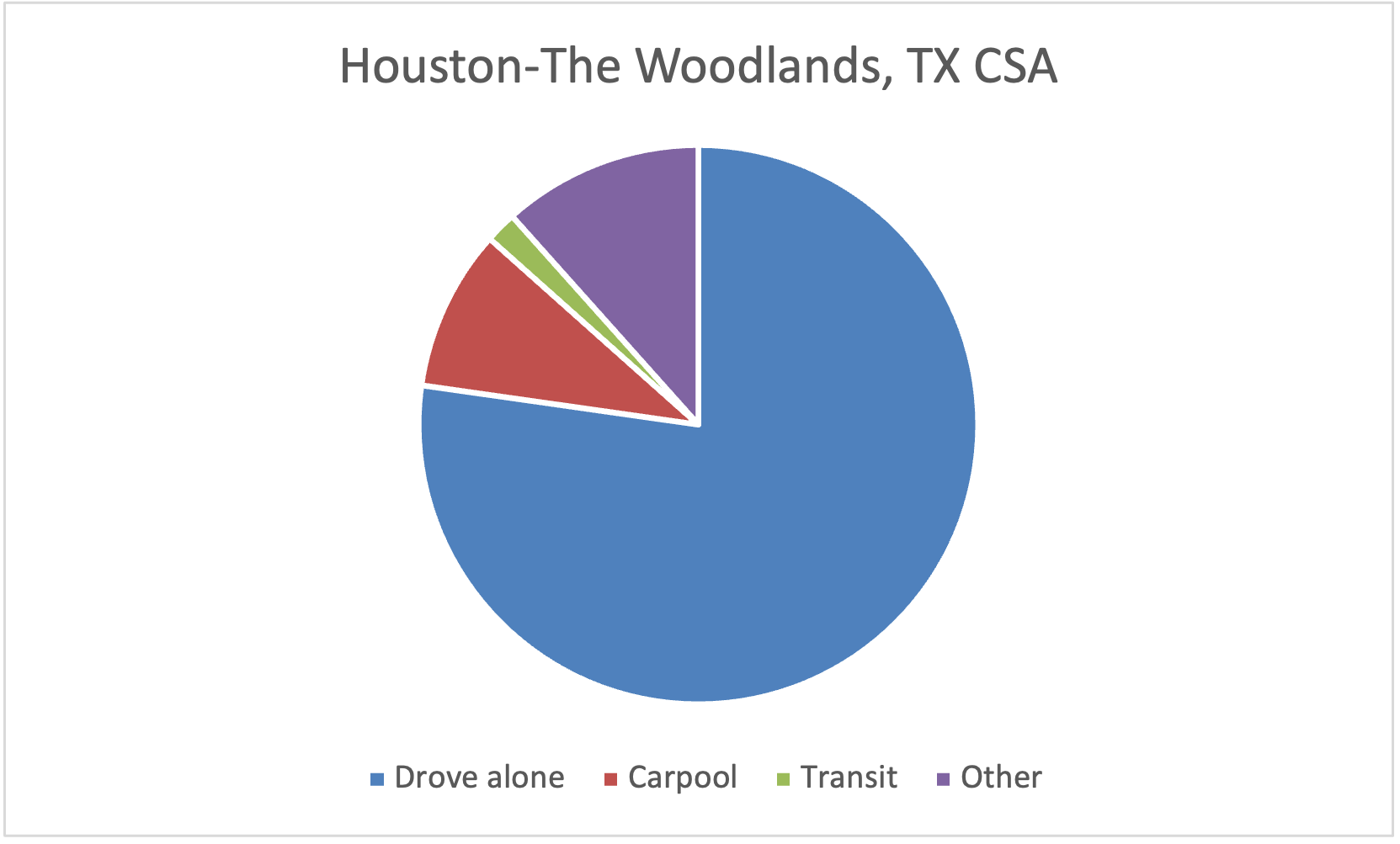
Pie chart showing mode share to work in Dallas-Fort Worth; driving is dominant

Pie charts in Excel

  • Let’s use the “Stacked bar” tab to make a pie chart of commute mode in the Triangle
  • Select the row with the Triangle
  • Insert -> Chart -> 2D pie chart
  • The labels are probably wrong; click “Select data” and specify the range for the category labels

Other gimmicks kinds of charts

  • There are lots of other kinds of charts that are occasionally useful
  • But probably 95% of charting needs are covered by what we’ve seen today
  • It’s easy to get carried away

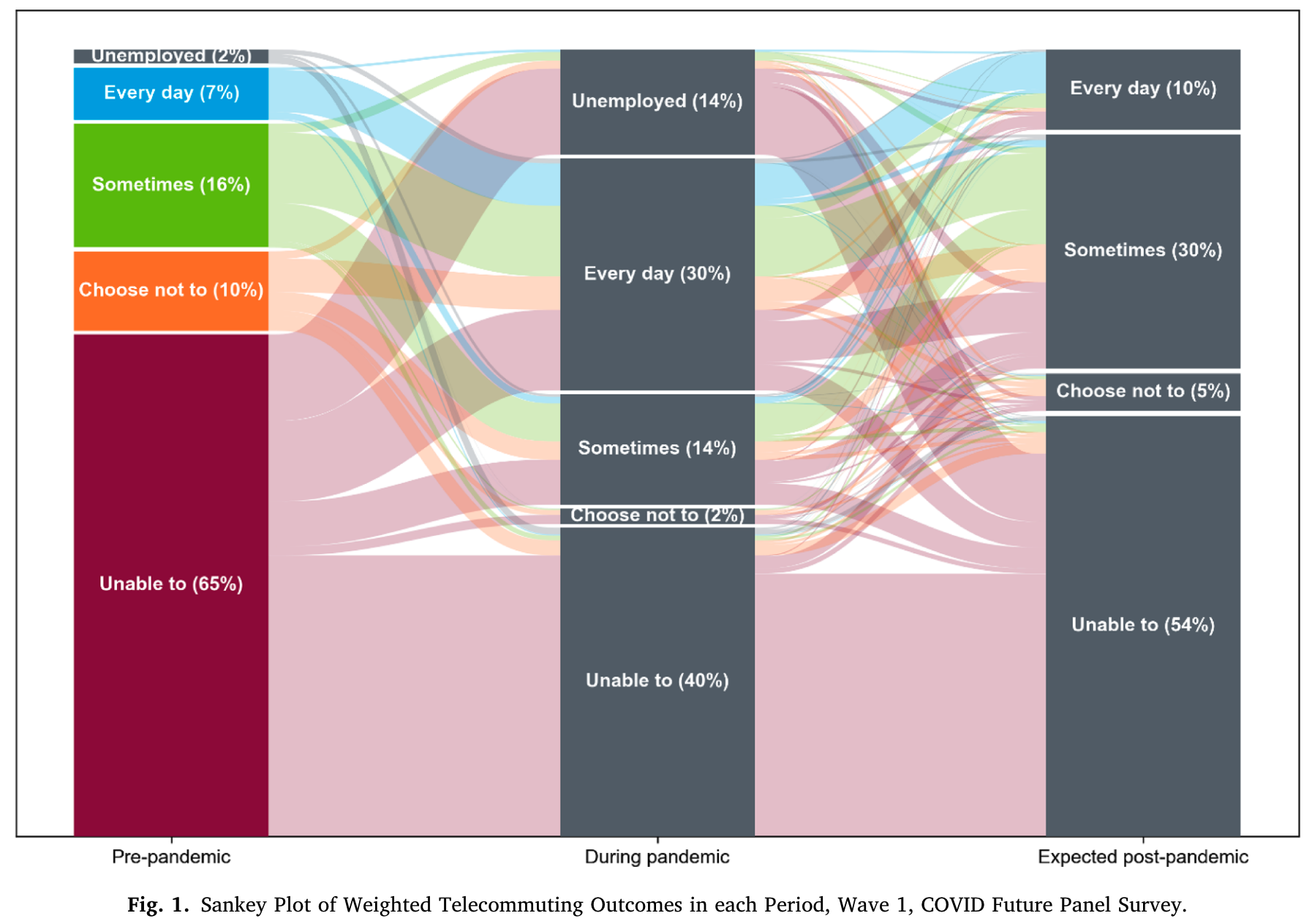
A sankey chart - a stacked bar chart for three time periods, with lines indicating how people transition between work from home statuses.

Accessibility concerns: alternative text

  • Charts are a graphical element, and are not accessible to all individuals
  • Many visually-impaired individuals will use a screen reader, software that speaks the text on their screen out loud
  • All charts should either have alternative (alt) text, or be fully described in the text of the report
    • Add alt text in Word by right-clicking and choosing “view alt text”
    • Also applies to non-decorative images
  • For small charts, you can list the values in the alt text (e.g. the percentages drving alone, etc.)
  • For larger charts, you should describe overall trends/findings
  • For many organizations, ensuring accessibility is a legal requirement under Section 508 of the Americans with Disabilities Act

Thanks to Dhruti Bhagat-Conway for recommendations on this section

Accessibility concerns: color vision deficiency
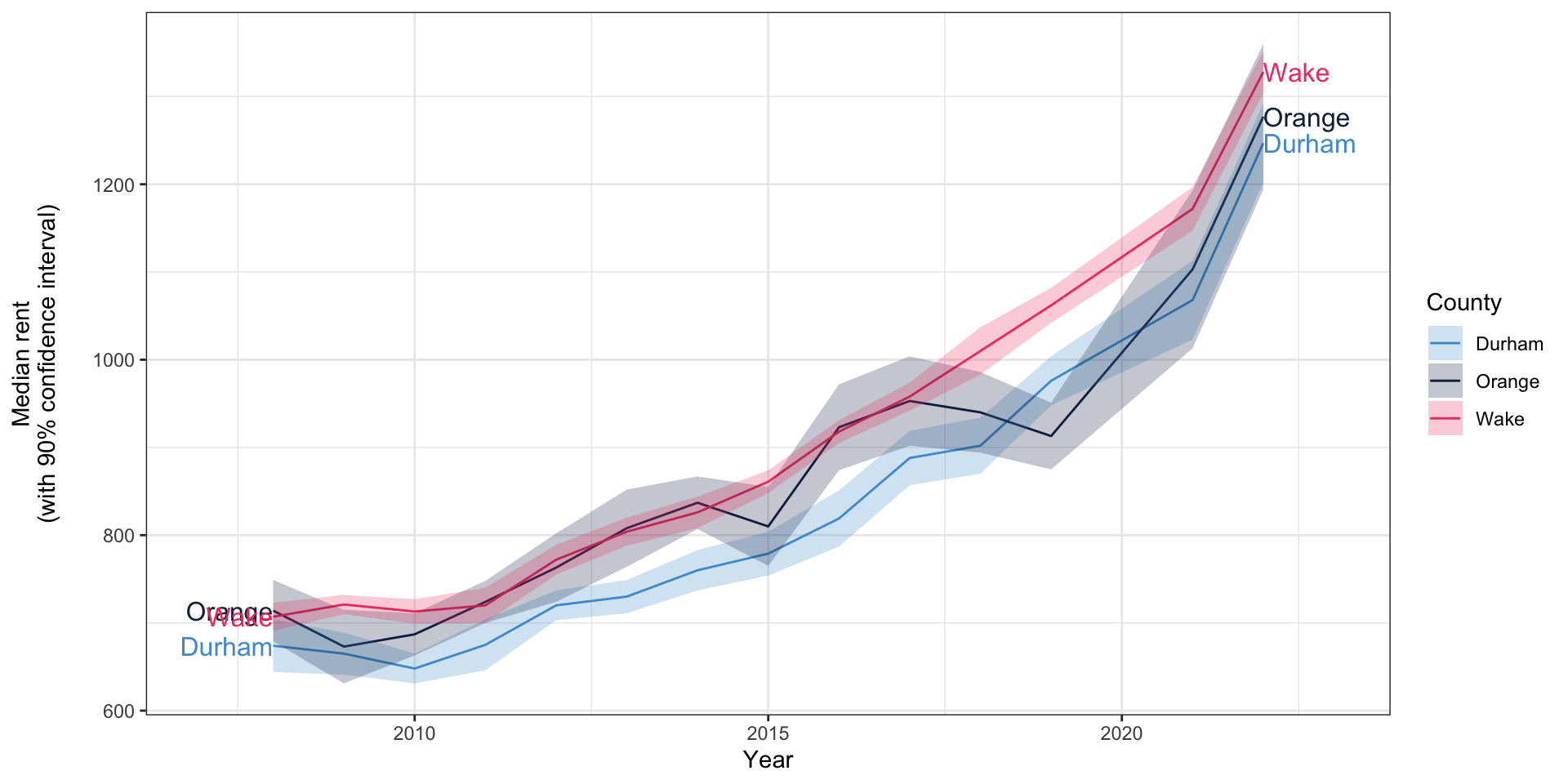
  • Color vision deficiencies (color-blindness) are very common, especially among White males (~8%) (Machado et al. 2009)
  • This can make charts useless

Accessibility concerns: color vision deficiency

Chart showing rent increases in Orange, Durham, and Wake counties (repeated from above)

Deuteranomaly (red-green): very common

Protanomaly (red-green): less common

Tritanomaly (blue-yellow): rare
What to do about it

  • Avoid presenting information only using color
  • Avoid using red and green together
  • Vary saturation and brightness in addition to color

Contrast

  • Can you read this?
  • Text and graphical elements should provide enough contrast that they are easily distinguishable
  • You can check the contrast of two colors using the WebAIM contrast checker
  • Or generate color schemes using Coolers

Logarithmic (log) scales

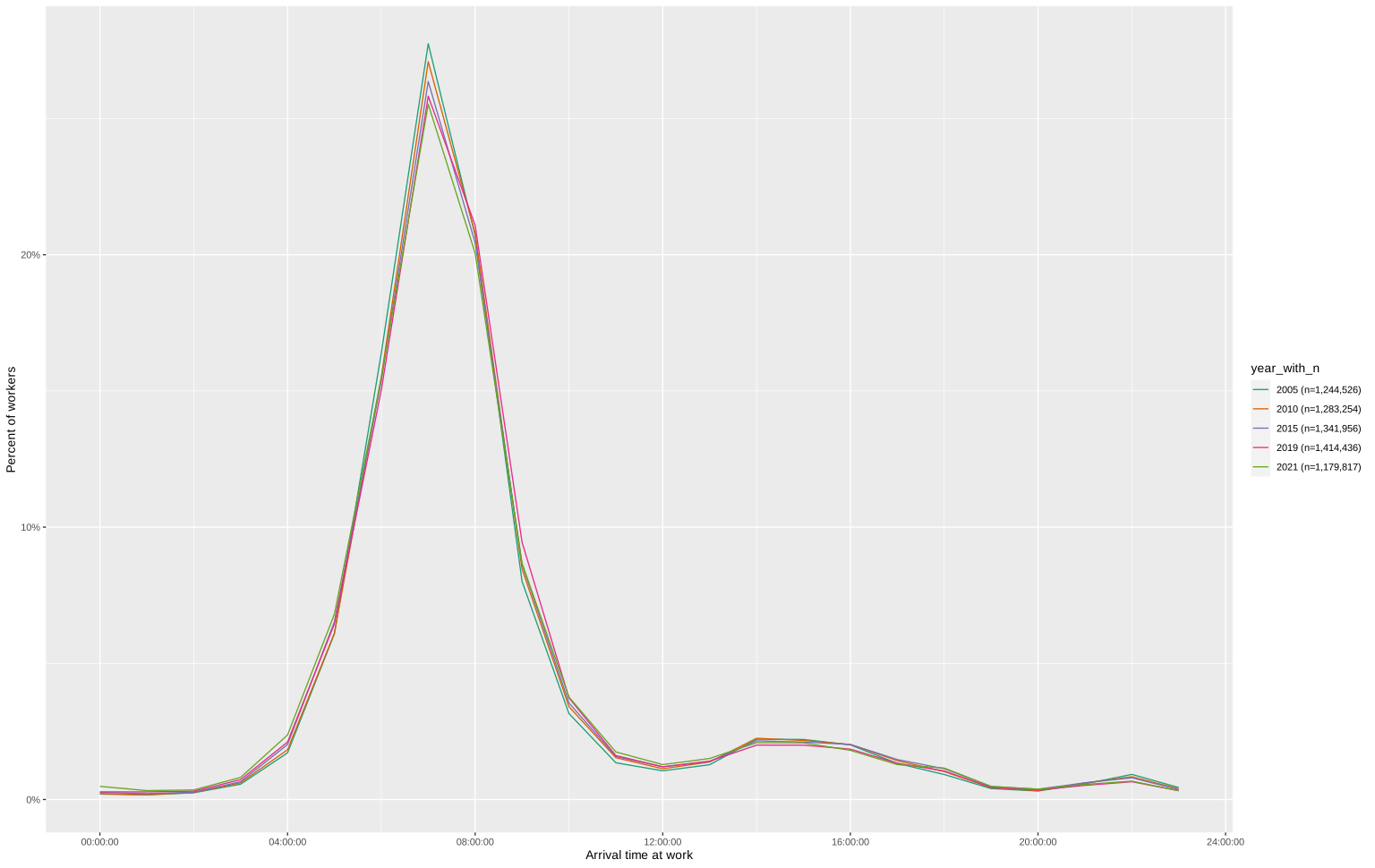
Line plot of when people arrive at work in different years, with a linear scale.

Linear scale

Palm and Bhagat-Conway, under review; data: IPUMS

Logarithmic (log) scales
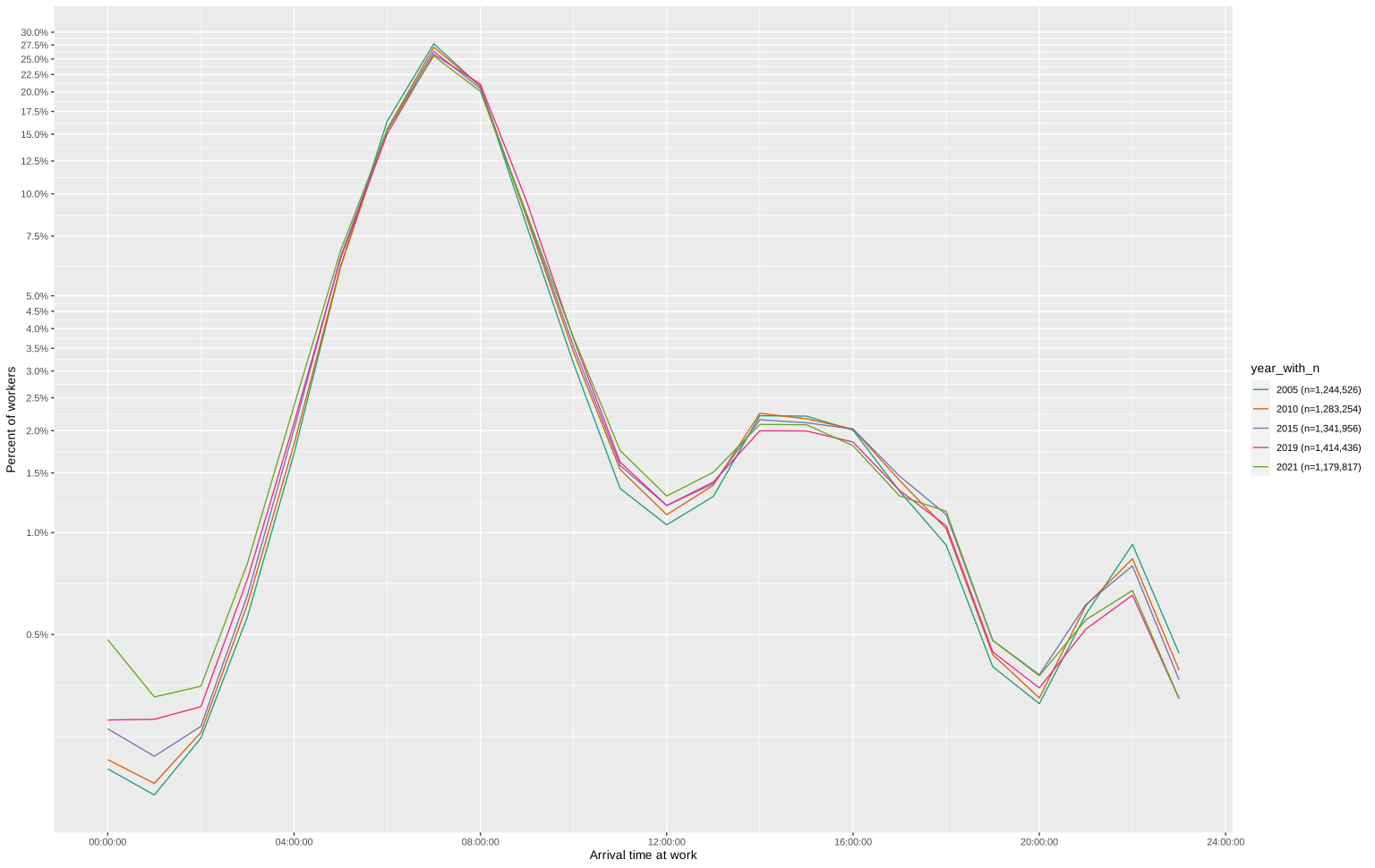
Line plot of when people arrive at work in different years, with a log scale emphasizing the increases overnight when few people are arriving at work, but the growth rate is significant.

Logarithmic scale

Palm and Bhagat-Conway, under review; data: IPUMS

Logarithmic (log) scales
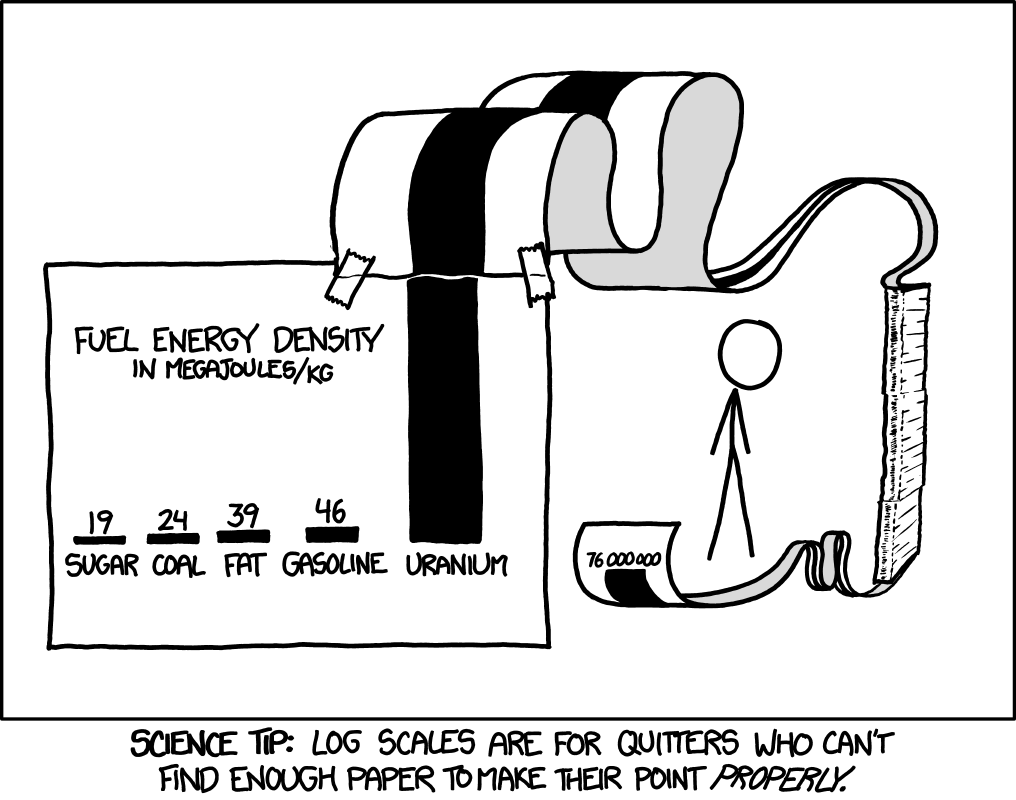
© xkcd

Log-log scales
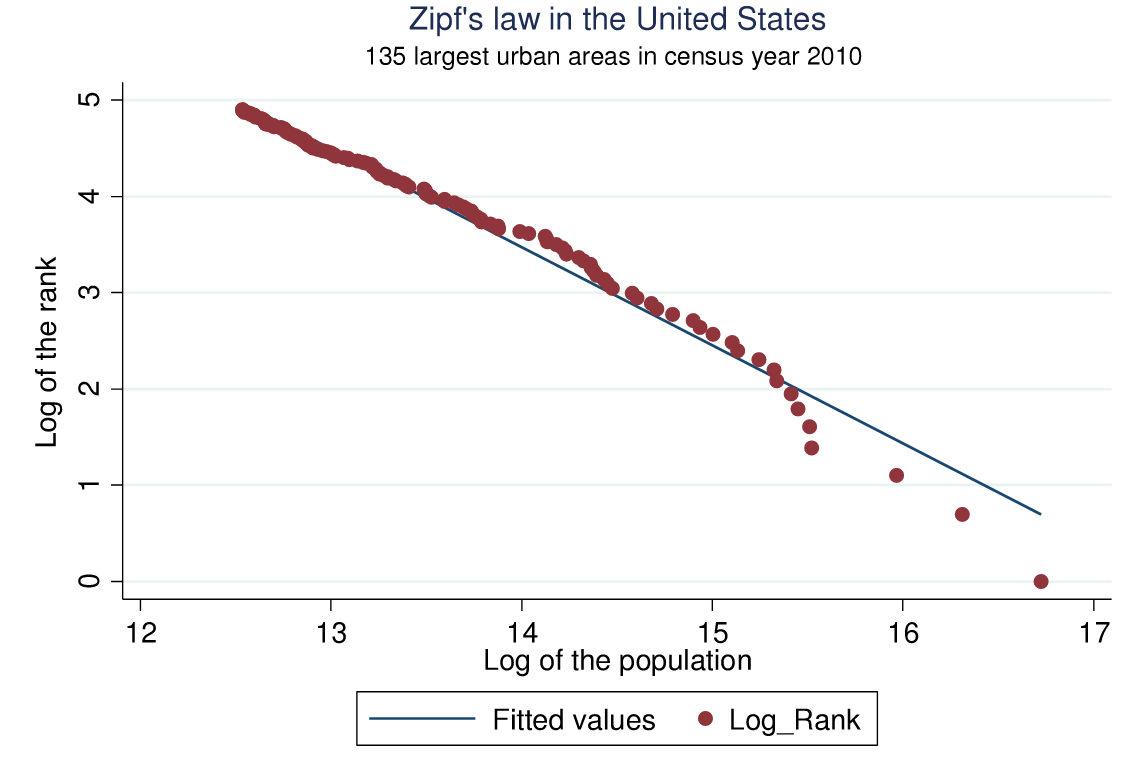
Figure demonstrating that US cities follow a Zipf/power-law distribution, using a log-log scale so the exponential growth is represented as a straight line

Arshad et al. (2018)

Other ways axes can mislead
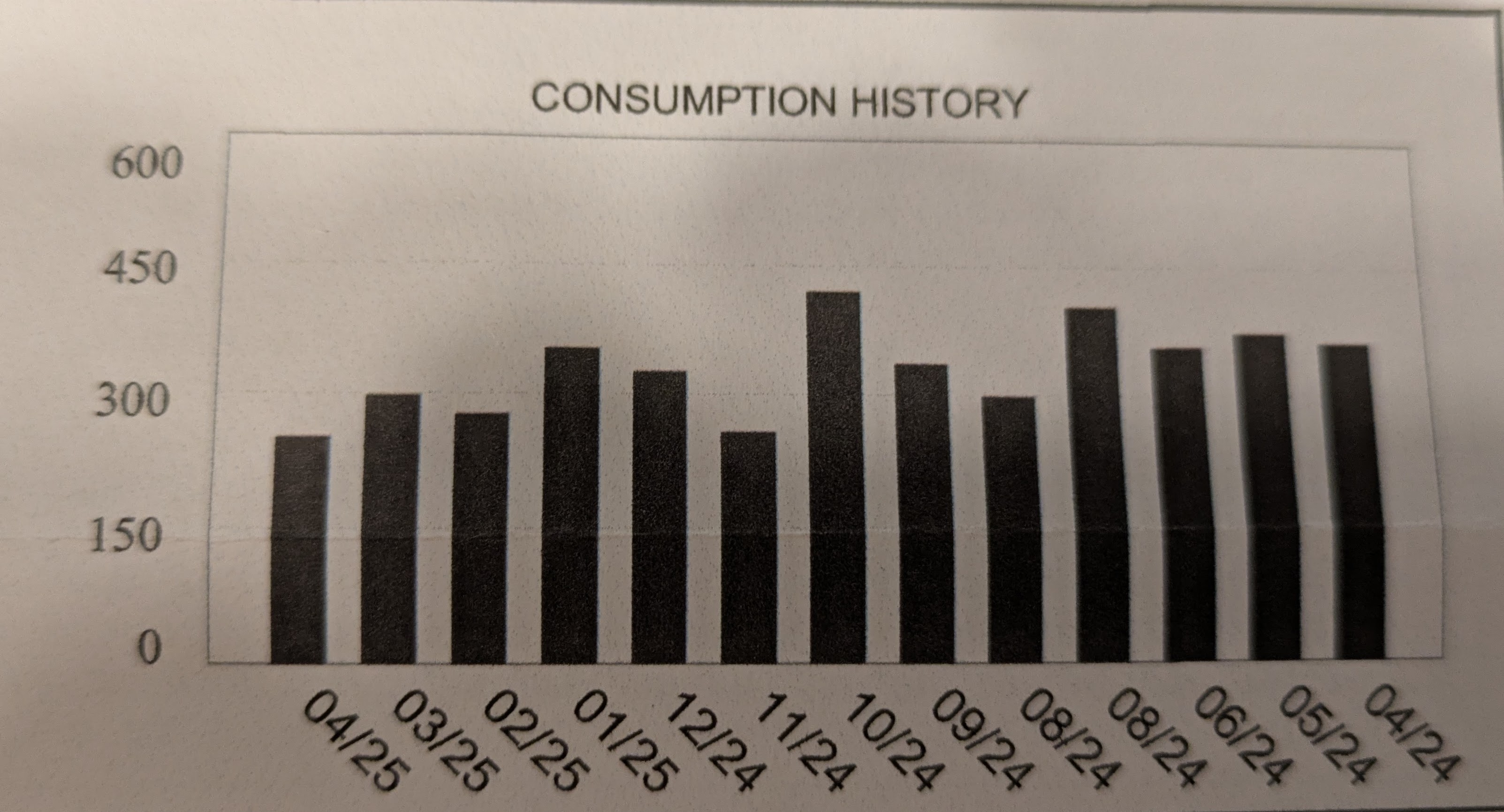
A bar plot showing water consumption by month, in cubic feet. Consumption appears to be trending up, but the x axis has time decreasing as you go further right, meaning that consumption is trending down.

More misleading axes

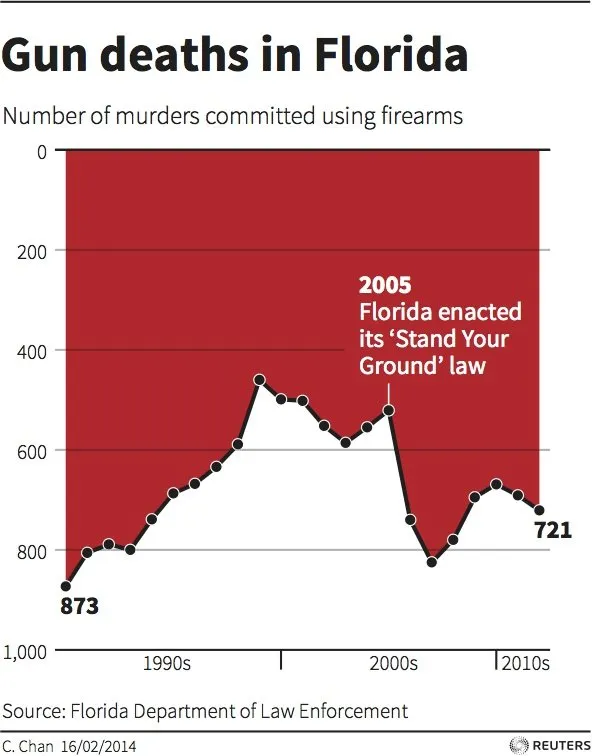
Line chart appearing to show that gun deaths dropped after Florida's stand your ground law, but the y axis has larger numbers at the bottom.

Reuters via LiveScience

And more…

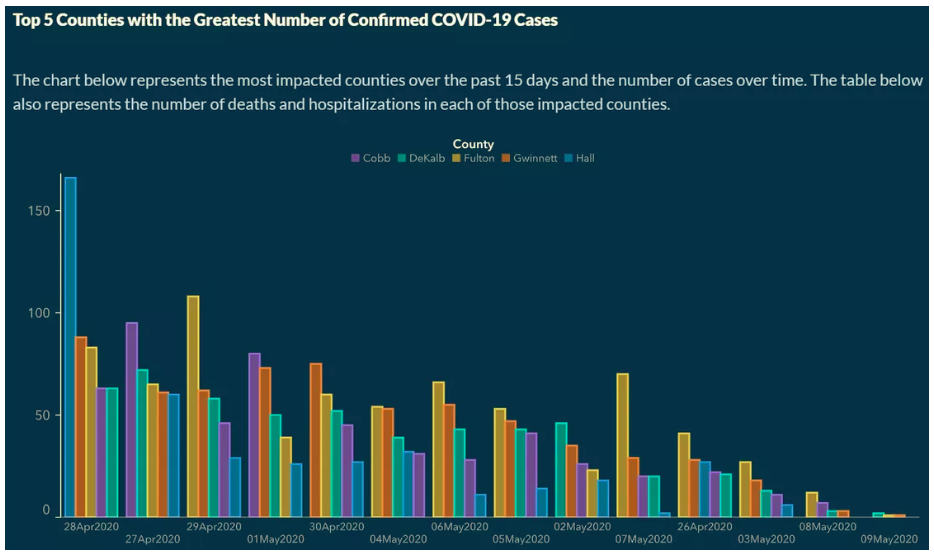
A bar graph that appears to show COVID cases decreasing, but the x axis is ordered by number of cases rather than date

Georgia Dept of Public Health via Columbia Climate Law/Atlanta Journal-Constitution

Chart formatting in Excel

  • Most tools to customize your chart are on the “Chart Design” and “Format” toolbars
  • Double-clicking on elements of a chart lets you format and edit them

Advanced charting tools

  • In R, the ggplot package is widely known and used, and very powerful
  • matplotlib is the go-to plotting library for Python

References

Anscombe, F. J. 1973. “Graphs in Statistical Analysis.” The American Statistician 27 (1): 17–21. https://doi.org/10.2307/2682899.
Arshad, Sidra, Shougeng Hu, and Badar Nadeem Ashraf. 2018. “Zipf’s Law and City Size Distribution: A Survey of the Literature and Future Research Agenda.” Physica A: Statistical Mechanics and Its Applications 492 (February): 75–92. https://doi.org/10.1016/j.physa.2017.10.005.
Bhagat-Conway, Matthew Wigginton, and Sam Zhang. 2023. “Rush Hour-and-a-Half: Traffic Is Spreading Out Post-Lockdown.” PLoS One.
Machado, G. M., M. M. Oliveira, and L. Fernandes. 2009. “A Physiologically-based Model for Simulation of Color Vision Deficiency.” IEEE Transactions on Visualization and Computer Graphics 15 (6): 1291–98. https://doi.org/10.1109/TVCG.2009.113.

Creative Commons License
This work by Matthew Bhagat-Conway is licensed under a Creative Commons Attribution 4.0 International License.