Working with archived data
archived.RmdA single GTFS-realtime file is a snapshot of the state of a transit system in time. However, from an analytical perspective it is often more useful to archive GTFS-realtime feeds over time (once every minute is common), and then analyze a whole slew of GTFS-realtime feeds at once.
This vignette discusses how to aggregate multiple vehicle position feeds and get a table of vehicle positions over the course of (e.g.) a full day, and do some basic analysis with it.
The data

plot of chunk unnamed-chunk-12
In this vignette, we will work with one day of archived GTFS-realtime position data from the MTA New York City Transit Bus realtime feed. These positions over the course of the day are shown above; at the end of this vignette we will see how to make this animation.
This data is too large to include with the gtfsrealtime
package, so it
is available for download here. The R code below will download and
unzip one day of GTFS-realtime vehicle position files, and place it in a
directory nyc-bus-demo in the current working
directory.
suppressMessages({
  if (!file.exists("nyc-bus-demo.zip")) {
    download.file(
      "https://files.indicatrix.org/gtfsrealtime-r/nyc-bus-demo.zip",
      "nyc-bus-demo.zip"
    )
  }
})
Load libraries
Next, we need to load libraries. We use quite a few different
libraries in this vignette; not all will be required for every analysis.
ggplot2, dplyr, lubridate, and
purrr are all part of the tidyverse and could alternately
be loaded with library(tidyverse).
## data.table 1.17.8 using 4 threads (see ?getDTthreads).  Latest news: r-datatable.com
##
## Attaching package: 'data.table'
##
## The following object is masked from 'package:purrr':
##
## transpose##
## Attaching package: 'dplyr'
##
## The following objects are masked from 'package:data.table':
##
## between, first, last
##
## The following objects are masked from 'package:stats':
##
## filter, lag
##
## The following objects are masked from 'package:base':
##
## intersect, setdiff, setequal, union##
## Attaching package: 'lubridate'
##
## The following objects are masked from 'package:data.table':
##
## hour, isoweek, mday, minute, month, quarter, second, wday, week, yday, year
##
## The following objects are masked from 'package:base':
##
## date, intersect, setdiff, union## Linking to GEOS 3.14.1, GDAL 3.5.3, PROJ 9.5.1; sf_use_s2() is TRUENext, we read in multiple GTFS-realtime files, and stack them all
together. There are 1,440 GTFS-realtime files, from 3:00 AM local time
on January 28, 2026 to 2:59 AM local time on January 29. We use the
Sys.glob function to match multiple files - in this case,
every vehicle position file in nyc-bus-demo. The
* means “anything”, so this will match any file that starts
with nyc-bus-demo/vehicle-positions- and ends with
.pb.bz2. (.pb.bz2 means a Protocol Buffers
file, the underlying format of GTFS-realtime, compressed using
bzip2. ‘gtfsrealtime’ can load files compressed with
gzip or bzip2 directly). We use the
map function from ‘purrr’ to apply a function to each file
name, and the rbindlist function to stack all of the
records into a single data.table.
GTFS-realtime does not include time zone information; all times are
specified in UTC. We specify a time zone so that times are automatically
converted to local time. Time zones are specified in standardized TZ
database format (generally Continent/City; for a list, see
here). If you do not want to convert times, you can specify a time
zone of Etc/UTC.
Read data
# gtfsrealtime can read multiple GTFS realtime feeds in a zip file, as long as there is nothing else in the ZIP file
system.time({positions = read_gtfsrt_positions("nyc-bus-demo.zip", "America/New_York")})
## user system elapsed
## 9.983 2.821 13.996
head(positions)## id latitude longitude bearing odometer speed trip_id route_id direction_id
## 1 MTA NYCT_7116 40.65841 -73.90079 204.64677 NA NA EN_A6-Weekday-SDon-021000_B15_103 B15 1
## 2 MTA NYCT_8447 40.65276 -73.73687 87.46083 NA NA JA_A6-Weekday-SDon-019500_Q86_653 Q86 1
## 3 MTA NYCT_9760 40.82083 -73.93955 52.98173 NA NA MV_A6-Weekday-SDon-019400_M2_202 M2 0
## 4 MTA NYCT_7102 40.66895 -73.91563 187.95752 NA NA EN_A6-Weekday-SDon-023000_B12_1 B12 1
## 5 MTA NYCT_8481 40.62516 -74.14923 173.41806 NA NA CA_A6-Weekday-SDon-021000_S4898_71 S48 1
## 6 MTA NYCT_5314 40.85237 -73.88198 254.32916 NA NA WF_A6-Weekday-SDon-019500_BX19_301 BX19 1
## start_time start_date schedule_relationship stop_id current_stop_sequence current_status timestamp
## 1 <NA> 20260128 <NA> 301050 NA <NA> 2026-01-28 03:55:53
## 2 <NA> 20260128 <NA> 700896 NA <NA> 2026-01-28 03:56:09
## 3 <NA> 20260128 <NA> 400241 NA <NA> 2026-01-28 03:56:06
## 4 <NA> 20260128 <NA> 301594 NA <NA> 2026-01-28 03:55:52
## 5 <NA> 20260128 <NA> 201566 NA <NA> 2026-01-28 03:55:59
## 6 <NA> 20260128 <NA> 100642 NA <NA> 2026-01-28 03:55:58
## congestion_level occupancy_status occupancy_percentage vehicle_id vehicle_label vehicle_license_plate
## 1 <NA> MANY_SEATS_AVAILABLE NA MTA NYCT_7116 <NA> <NA>
## 2 <NA> <NA> NA MTA NYCT_8447 <NA> <NA>
## 3 <NA> MANY_SEATS_AVAILABLE NA MTA NYCT_9760 <NA> <NA>
## 4 <NA> <NA> NA MTA NYCT_7102 <NA> <NA>
## 5 <NA> <NA> NA MTA NYCT_8481 <NA> <NA>
## 6 <NA> <NA> NA MTA NYCT_5314 <NA> <NA>
## vehicle_wheelchair_accessible file_timestamp file_index
## 1 <NA> 2026-01-28 03:56:17 1
## 2 <NA> 2026-01-28 03:56:17 1
## 3 <NA> 2026-01-28 03:56:17 1
## 4 <NA> 2026-01-28 03:56:17 1
## 5 <NA> 2026-01-28 03:56:17 1
## 6 <NA> 2026-01-28 03:56:17 1We have read 2.8 million vehicle observations:
nrow(positions)## [1] 2825902Clean data
Some of the observations are duplicates, as not every bus reports in every minute. We can identify these based on timestamp and vehicle ID, and go down to a single record per report. This uses ‘data.table’ syntax, which is somewhat more obtuse than ‘tidyverse’, but orders of magnitude faster - important with large datasets such as this.
The syntax below groups by timestamp and vehicle ID (the last part).
It then takes the first row of each SubDataset
(.SD[1]).
Note that, at least in the New York data, there are sometimes multiple reports with the same timestamp and vehicle ID but different locations. This is some type of data error, so I just arbitrarily pick one.
# data.table allows fast manipulation of tabular data with a powerful syntax
positions = data.table(positions)

positions = positions[, .SD[1], by = c("timestamp", "vehicle_id")]
The data are spatial, so we can convert to an sf object
for remaining spatial analyses. The data in GTFS realtime is always WGS
84 latitude/longitude, so we specify that the CRS is 4326 when creating
the dataset, then immediately project to 32118, State Plane New York
Long Island.
positions = positions |>
  st_as_sf(coords=c("longitude", "latitude"), crs=4326) |>
  st_transform(32118)
Getting a snapshot state at any given time
To get the positions of all vehicles at any given time, we want to grab all position reports within (say) the last five minutes, and get the most recent one for each vehicle. We can write a function to do this:
snapshot_positions = function (positions, time, tolerance_mins=5) {
  # sf uses tidyverse syntax rather than data.table
  positions |>
    filter(timestamp <= time & timestamp >= time - minutes(tolerance_mins)) |>
    group_by(vehicle_id) |>
    slice_max(timestamp)
}
And we can use that function to get all vehicle positions at 8 AM on the day our data were collected:
# note! important to specify correct time zone
pos_8am = snapshot_positions(positions, ymd_hms("2026-01-28 8:00:00", tz = "America/New_York"))
We could plot those positions:
ggplot(pos_8am) +
  geom_sf() +
  # theme_void removes all plot elements
  theme_void()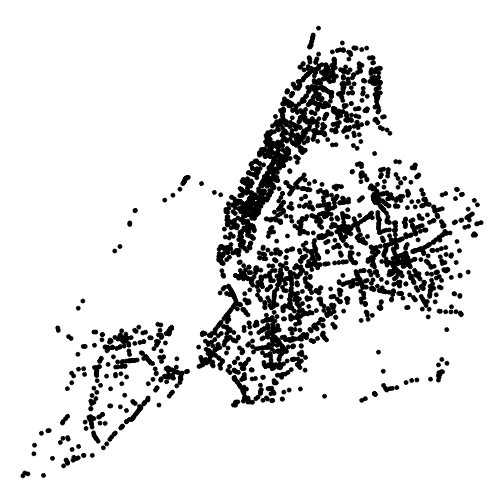
plot of chunk unnamed-chunk-8
Animating positions
Now we get to making the figure we saw at the top. We will render one “frame” (plot of bus locations) for each minute, and then use gifski to convert to an animated GIF. First, we will create a temporary directory to hold those frames:
framedir = tempfile()
dir.create(framedir)
Next, we will render the plots to image files in that directory, one at a time. We have data from 3am NYC time 2026-01-28 to 3am 2026-01-29, so we will have 1,440 frames one minute apart.
# as.list is necessary to preserve column type:
# https://stackoverflow.com/questions/77838146
times = as.list(ymd_hms("2026-01-28 03:00:00", tz="America/New_York") + minutes(0:1440))

# get the bounding box of all positions over the course
# of the day, so that every frame has the same extent
bbox = st_bbox(positions)

for (time in times) {
  current_pos = snapshot_positions(positions, time)
  p = ggplot(current_pos) +
    theme_void() +
    geom_sf(size=0.3) +
    xlim(bbox$xmin, bbox$xmax) +
    ylim(bbox$ymin, bbox$ymax) +
    # add the current time as the title
    ggtitle(format(time, "%B %d, %H:%M"))

  # save the frame, using the Unix timestamp in the filename
  ggsave(
    file.path(framedir, paste0("time", as.numeric(time), ".png")),
    width=4, height=4, dpi=100, bg="white", plot = p)
}
Lastly, we render all the frames we created to an animated GIF:
gifski(
  list.files(framedir, full.names=TRUE),
  "figures/nyc_bus_anim.gif",
  # twenty minutes per second
  delay = 1 / 20,
  # match resolution of input files (4 in by 4 in at 100 dpi)
  width = 400,
  height = 400
)
## Error in gifski(list.files(framedir, full.names = TRUE), "figures/nyc_bus_anim.gif", : Target directory does not exist:figuresplot of chunk unnamed-chunk-12
And finally, clean up after ourselves by removing the temporary directory.
unlink(framedir, recursive=TRUE)Extracting trajectories
We can also extract the trajectories that particular vehicles took over the course of the day. We do this by grouping by vehicle ID (we could also group by trip ID to get single runs), and then summarizing and converting the combined points into a linestring (line feature).
This is quite slow, which seems to be related to the use of
st_cast; this issue needs further investigation.
trajectories = positions |>
  arrange(vehicle_id, trip_id, timestamp) |>
  group_by(vehicle_id, trip_id) |>
  summarize(do_union=FALSE) |>
  st_cast("LINESTRING")
## `summarise()` has regrouped the output.
## ℹ Summaries were computed grouped by vehicle_id and trip_id.
## ℹ Output is grouped by vehicle_id.
## ℹ Use `summarise(.groups = "drop_last")` to silence this message.
## ℹ Use `summarise(.by = c(vehicle_id, trip_id))` for per-operation grouping (`?dplyr::dplyr_by`) instead.We can then plot all of those trajectories over the course of the day:
ggplot(trajectories) +
  theme_void() +
  geom_sf()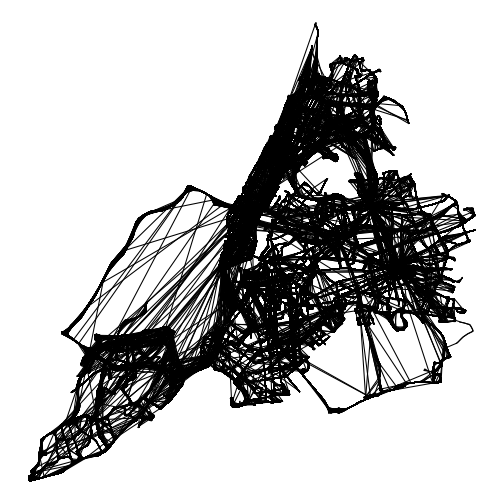
plot of chunk unnamed-chunk-14
Or extract a single trajectory:
ggplot(trajectories[2, ]) +
  theme_void() +
  geom_sf()
plot of chunk unnamed-chunk-15
Or extract a single trajectory and combine it with times:
trajectory = trajectories[2, ]
points = positions |>
  filter(vehicle_id == trajectory$vehicle_id & trip_id == trajectory$trip_id)

ggplot() +
  geom_sf(data=trajectory) +
  geom_sf(data=points) +
  # label the times the bus reached each point
  geom_sf_label(
    data=points,
    aes(label=format(timestamp, "%H:%M")),
    position = position_nudge(x=120)
  ) +
  theme_void()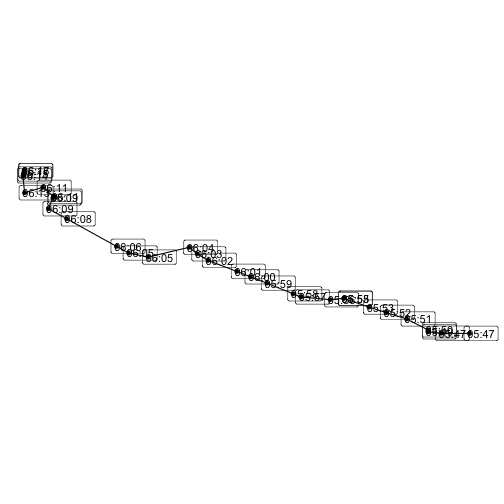
plot of chunk unnamed-chunk-16